Dapr Workflow lets you write a long-running business process as ordinary C# code, and the sidecar makes it durable by replaying it from a state store after a crash.
.NET Aspire runs the app, the sidecar, and the state store with a single aspire run command.
Anything non-deterministic, like DateTime.Now or I/O, has to live in an activity.
AI agents don't have an intelligence problem, they have a context problem. Redis Iris is a real-time context engine that transforms fragmented data into live, agent-ready context and memory. Feed your agents the right data, in the right form, at the right time. Try for free today.
Build and ship at the Runpod Flash Hack Day! Join Runpod on June 30 at the SF Builder's Collective for an in-person hackathon. Remote-friendly. Learn how to use Runpod Flash to turn Python functions into auto-scaling, serverless GPU endpoints without Docker. Demos, prizes, and mentorship. Register here.
Most real business processes don't finish in a single request.
An order gets placed, inventory gets checked, a payment gets charged, stock gets reserved, and the customer gets notified. Each step can fail, time out, or need a retry. And the whole thing has to survive a process restart without losing its place or charging someone twice.
We usually solve this with a pile of queues, a state table, and a lot of defensive code to track where each process is. It works, but the business logic ends up scattered across handlers and database rows, and nobody can read the flow top to bottom anymore.
Dapr (a graduated CNCF project) has a building block for exactly this: Workflow. You write the process as ordinary C# code, and Dapr makes it durable. If the host crashes halfway through, the workflow picks up right where it left off.
In this article, we'll build a small Dapr Workflow, run it with .NET Aspire, and inspect its state with the Diagrid Dev Dashboard. If you'd rather learn this hands-on, there's also a free Dapr University track built around this exact stack.
Let's dive in.
What Dapr Workflow Actually Is
You define a workflow that orchestrates a process, and activities that do the actual work (call a database, hit an API, send an email). This is orchestration rather than choreography: one place drives the process instead of services reacting to each other's events.
The definitions live in your app; the workflow engine that executes them runs in the Dapr sidecar:
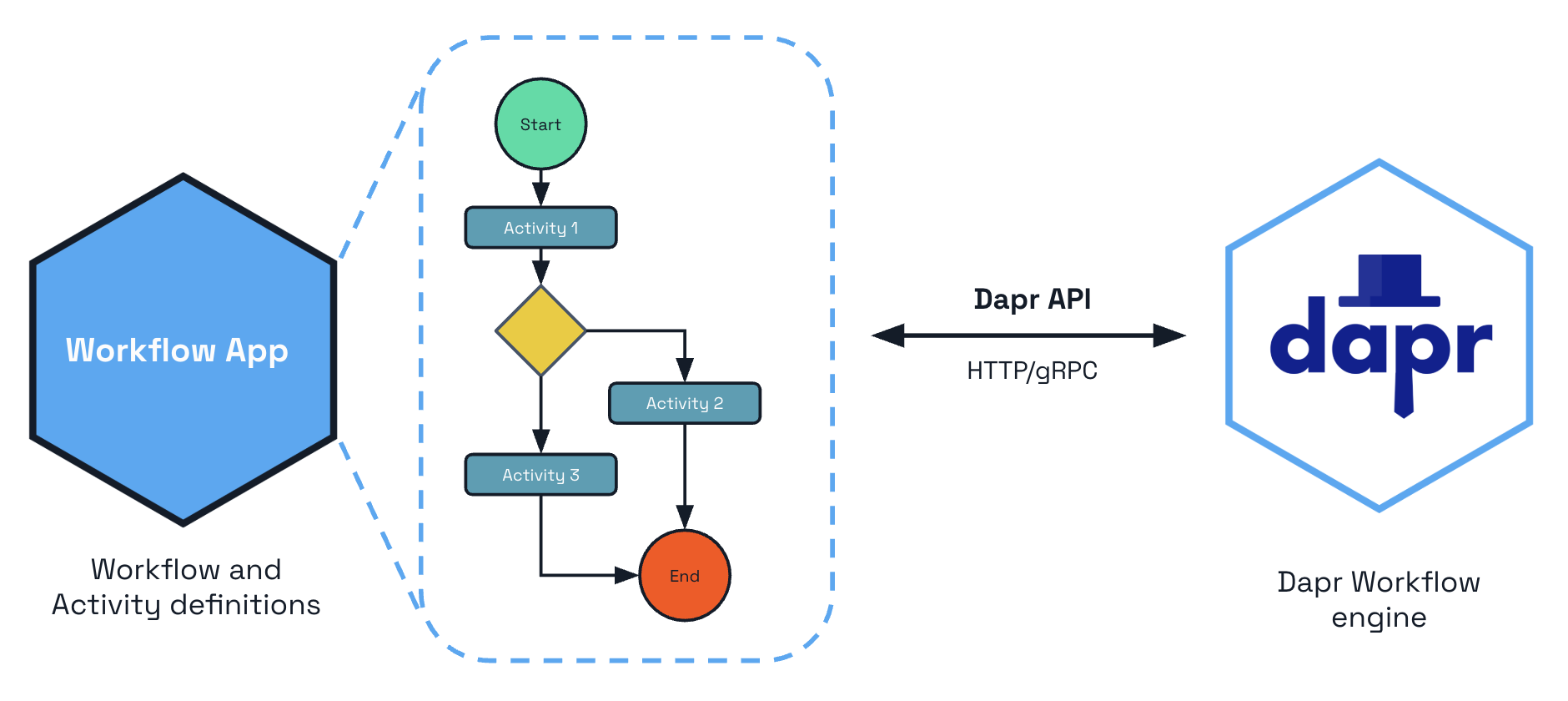
Source: Dapr - Workflows overview
The key idea is durable execution. Dapr records every step to a state store, so the workflow can be replayed from history at any time. A crash, a deployment, or a scale-out event doesn't lose progress, and a workflow can run for seconds or for months.
One rule follows from this: workflow code must be deterministic.
No DateTime.Now, no random values, no I/O - anything non-deterministic goes into an activity.
Even logging is affected: use context.CreateReplaySafeLogger<T>() inside a workflow, or every replay will repeat your log lines.
Under the hood, this all runs on Dapr actors, which is why the state store must support actors. More on that in a moment.
Building the Workflow
The quickest starting point is the Aspire CLI's starter template:
aspire new aspire-starter -n OrderProcessing
It generates the app host, an API service, and a ServiceDefaults project that wires up OpenTelemetry and health checks (that's where the AddServiceDefaults call comes from later).
If you're on Claude Code, the Dapr Skills plugin can scaffold the entire workflow project from a prompt and review it for determinism mistakes.
Everything we build here is also in a working sample on my GitHub, so you can clone it and follow along.
The API service needs the Dapr.Workflow package:
<PackageReference Include="Dapr.Workflow" Version="1.18.1" />
A workflow derives from Workflow<TInput, TOutput> and reads top to bottom like a normal method, even though every step is durably persisted:
using Dapr.Workflow;

namespace OrderApi.Workflows;

internal sealed class OrderProcessingWorkflow : Workflow<OrderPayload, OrderResult>
{
    public override async Task<OrderResult> RunAsync(
        WorkflowContext context,
        OrderPayload order)
    {
        // 1. Check inventory
        var inventory = await context.CallActivityAsync<InventoryResult>(
            nameof(CheckInventoryActivity),
            order);

        if (!inventory.InStock)
        {
            return new OrderResult(order.OrderId, "Rejected: out of stock");
        }

        // 2. Charge the customer
        await context.CallActivityAsync(
            nameof(ProcessPaymentActivity),
            new PaymentRequest(order.OrderId, order.TotalAmount));

        // 3. Reserve the stock
        await context.CallActivityAsync(
            nameof(UpdateInventoryActivity),
            order);

        // 4. Notify the customer
        await context.CallActivityAsync(
            nameof(NotifyCustomerActivity),
            order.CustomerId);

        return new OrderResult(order.OrderId, "Completed");
    }
}
CallActivityAsync doesn't invoke the activity directly.
It schedules the work with the workflow engine, which records the result once the activity completes.
If the process dies after the payment step, Dapr replays the workflow, feeds it the recorded results for completed steps, and resumes at the inventory update.
The customer never gets charged twice.
This is the task chaining pattern.
Dapr Workflow also supports fan-out/fan-in, external events, timers, and child workflows - all in plain C# (fan-out is just Select plus Task.WhenAll).
If you want to build the richer patterns hands-on, the free Build Dapr Workflows in .NET with Aspire track has you fan out to parallel activities and aggregate the results.
One production caveat: the recorded history is tied to the shape of your code, so changing a workflow while instances are in flight breaks their replay. That's solved with workflow versioning; we're staying on version one here.
An activity is where the real work happens, and the only place you're allowed to be non-deterministic.
It derives from WorkflowActivity<TInput, TOutput> and supports constructor injection:
using Dapr.Workflow;

namespace OrderApi.Activities;

internal sealed class CheckInventoryActivity(IInventoryService inventory)
    : WorkflowActivity<OrderPayload, InventoryResult>
{
    public override async Task<InventoryResult> RunAsync(
        WorkflowActivityContext context,
        OrderPayload order)
    {
        bool inStock = await inventory.HasStockAsync(order.ProductId, order.Quantity);

        return new InventoryResult(inStock);
    }
}
The other activities follow the same shape: charge the card, decrement stock, send the confirmation email. Each one is isolated, so Dapr can retry a failed activity without re-running the whole workflow. And since every input and output gets serialized to the state store, simple JSON-friendly records are the right tool for these types.
Starting Workflows Over HTTP
Register the workflow and its activities in the API service's Program.cs:
builder.Services.AddDaprWorkflow(options =>
{
    options.RegisterWorkflow<OrderProcessingWorkflow>();

    options.RegisterActivity<CheckInventoryActivity>();
    options.RegisterActivity<ProcessPaymentActivity>();
    options.RegisterActivity<UpdateInventoryActivity>();
    options.RegisterActivity<NotifyCustomerActivity>();
});
This also registers a DaprWorkflowClient we can use to start and query workflow instances:
app.MapPost("/orders", async (
    OrderPayload order,
    DaprWorkflowClient workflowClient) =>
{
    string instanceId = await workflowClient.ScheduleNewWorkflowAsync(
        name: nameof(OrderProcessingWorkflow),
        instanceId: order.OrderId,
        input: order);

    return Results.Accepted($"/orders/{instanceId}", new { instanceId });
});

app.MapGet("/orders/{instanceId}", async (
    string instanceId,
    DaprWorkflowClient workflowClient) =>
{
    WorkflowState? state = await workflowClient.GetWorkflowStateAsync(instanceId);

    if (state is null || !state.Exists)
    {
        return Results.NotFound();
    }

    return Results.Ok(new
    {
        RuntimeStatus = state.RuntimeStatus.ToString(),
        Output = state.ReadOutputAs<OrderResult>()
    });
});
ScheduleNewWorkflowAsync returns immediately and the workflow runs in the background.
It's the same idea as scaling long-running API requests: return 202 Accepted and let the client poll for status.
Two SDK quirks worth knowing: GetWorkflowStateAsync returns null for an instance it has never seen, and RuntimeStatus is an enum that serializes as a bare number without the ToString().
Running Everything With Aspire
Here's where Aspire earns its keep. A Dapr Workflow needs a sidecar and a state store running alongside the app, and Aspire orchestrates all of it from one place.
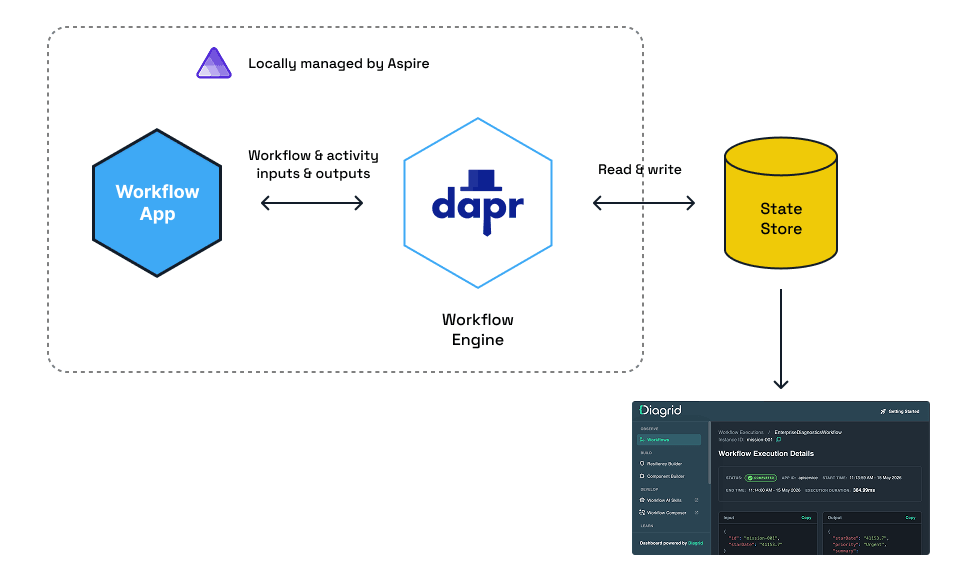
Source: Dapr University
The app host needs two packages.
The Dapr integration lives in the Aspire Community Toolkit these days; the original Aspire.Hosting.Dapr package is deprecated.
<PackageReference Include="CommunityToolkit.Aspire.Hosting.Dapr" Version="13.0.0" />
<PackageReference Include="Aspire.Hosting.Valkey" Version="13.4.3" />
Then the app host:
using CommunityToolkit.Aspire.Hosting.Dapr;

var builder = DistributedApplication.CreateBuilder(args);

builder.AddDapr();

// Pin the password. Aspire generates a random one on every run otherwise,
// and the Dapr component file below has to know it.
var statePassword = builder.AddParameter(
    "statestore-password", "state-store-123", secret: true);

// Valkey (a Redis fork) as the workflow state store
var statestore = builder
    .AddValkey("statestore", 16379, statePassword)
    .WithDataVolume();

builder.AddProject<Projects.OrderApi>("order-api")
    .WithDaprSidecar(new DaprSidecarOptions
    {
        ResourcesPaths = ["./Resources"]
    })
    .WaitFor(statestore);

builder.Build().Run();
WithDaprSidecar runs a Dapr sidecar next to order-api, and ResourcesPaths points it at the Dapr component files (relative paths resolve against the app host directory).
The one component the workflow needs is a state store - a statestore.yaml in the app host's Resources folder:
apiVersion: dapr.io/v1alpha1
kind: Component
metadata:
  name: workflowstore
spec:
  type: state.redis
  version: v1
  metadata:
    - name: redisHost
      value: 'localhost:16379'
    - name: redisPassword
      value: 'state-store-123'
    - name: actorStateStore
      value: 'true'
That actorStateStore: "true" line is the one people forget.
Dapr Workflow runs on top of actors, so without it, workflows won't run.
Notice the application never sees any of this: swapping Valkey for Postgres means editing this YAML file, not your C# code.
Install the Dapr CLI and run dapr init once (that's where the sidecar binary comes from), then start everything with a single command:
aspire run
Aspire spins up Valkey, the Dapr sidecar, and the API, with logs, traces, and health in one dashboard. Grab the API's port from there and post an order:
curl -X POST http://localhost:5555/orders \
  -H "Content-Type: application/json" \
  -d '{"orderId":"order-001","customerId":"cust-42","productId":"pro-plan","quantity":2,"totalAmount":49.99}'
Poll the status endpoint and you'll see the workflow march through its activities (if the first request returns a 500, give the sidecar a few more seconds to connect to the placement service):
curl http://localhost:5555/orders/order-001
{
  "runtimeStatus": "Completed",
  "output": {
    "orderId": "order-001",
    "status": "Completed"
  }
}
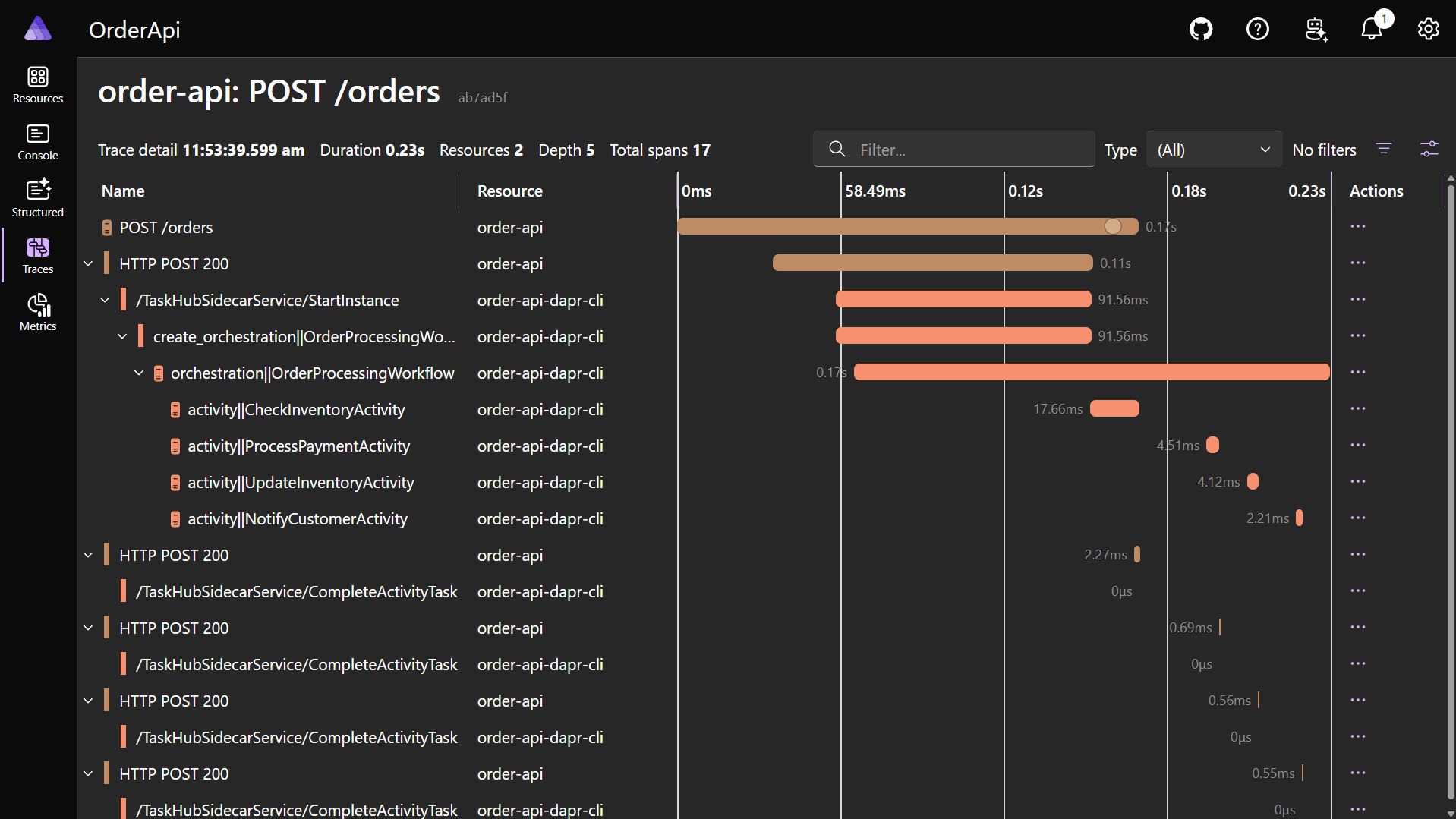
Each activity shows up as a span in the distributed trace:
Inspecting Workflow State Locally
The Aspire dashboard shows you the request flow, but not the workflow's internal state: which step it's on, what each activity returned, and the full execution history. For that, there's the Diagrid Dev Dashboard: a free, local-only tool that reads your workflow state store (Redis-compatible, Postgres, or SQLite) and visualizes every instance. It comes from Diagrid, the company founded by the creators of the Dapr OSS project, which also provides enterprise Dapr support.
Since the whole point of this setup is that one command starts everything, let's add it to the app host:
builder.AddContainer("diagrid-dashboard", "ghcr.io/diagridio/diagrid-dashboard:latest")
    .WithBindMount("./Resources", "/app/components")
    .WithEnvironment("COMPONENT_FILE", "/app/components/dashboard-store.yaml")
    .WithEnvironment("APP_ID", "diagrid-dashboard")
    .WithHttpEndpoint(targetPort: 8080)
    .WaitFor(statestore);
Why a second component file? Networking.
The sidecar runs as a host process, so localhost:16379 works for it.
The dashboard runs in a container, where localhost means the container itself, so its dashboard-store.yaml reaches the host through host.docker.internal
(on Linux without Docker Desktop, use the bridge gateway IP instead):
apiVersion: dapr.io/v1alpha1
kind: Component
metadata:
  name: dashboardstore
spec:
  type: state.redis
  version: v1
  metadata:
    - name: redisHost
      value: 'host.docker.internal:16379'
    - name: redisPassword
      value: 'state-store-123'
    - name: actorStateStore
      value: 'true'
scopes:
  - diagrid-dashboard
The scopes field keeps the API's sidecar from picking up this component, since both files sit in the same Resources folder.
Run aspire run again and open the dashboard's endpoint from the Aspire resources view.
Every workflow instance is listed with its status, app ID, and duration:
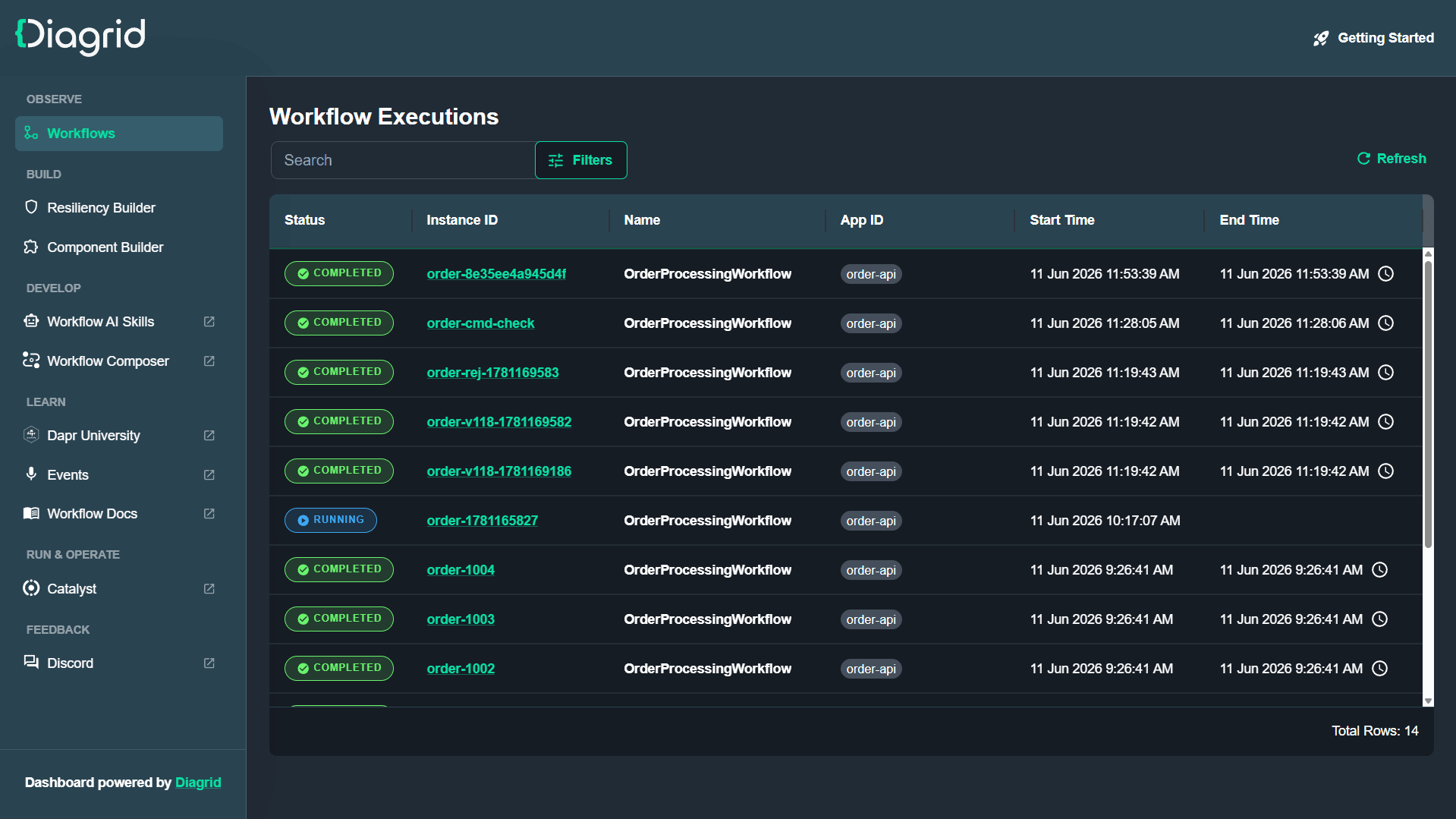
Clicking an instance shows the exact input the workflow received and the output it produced:
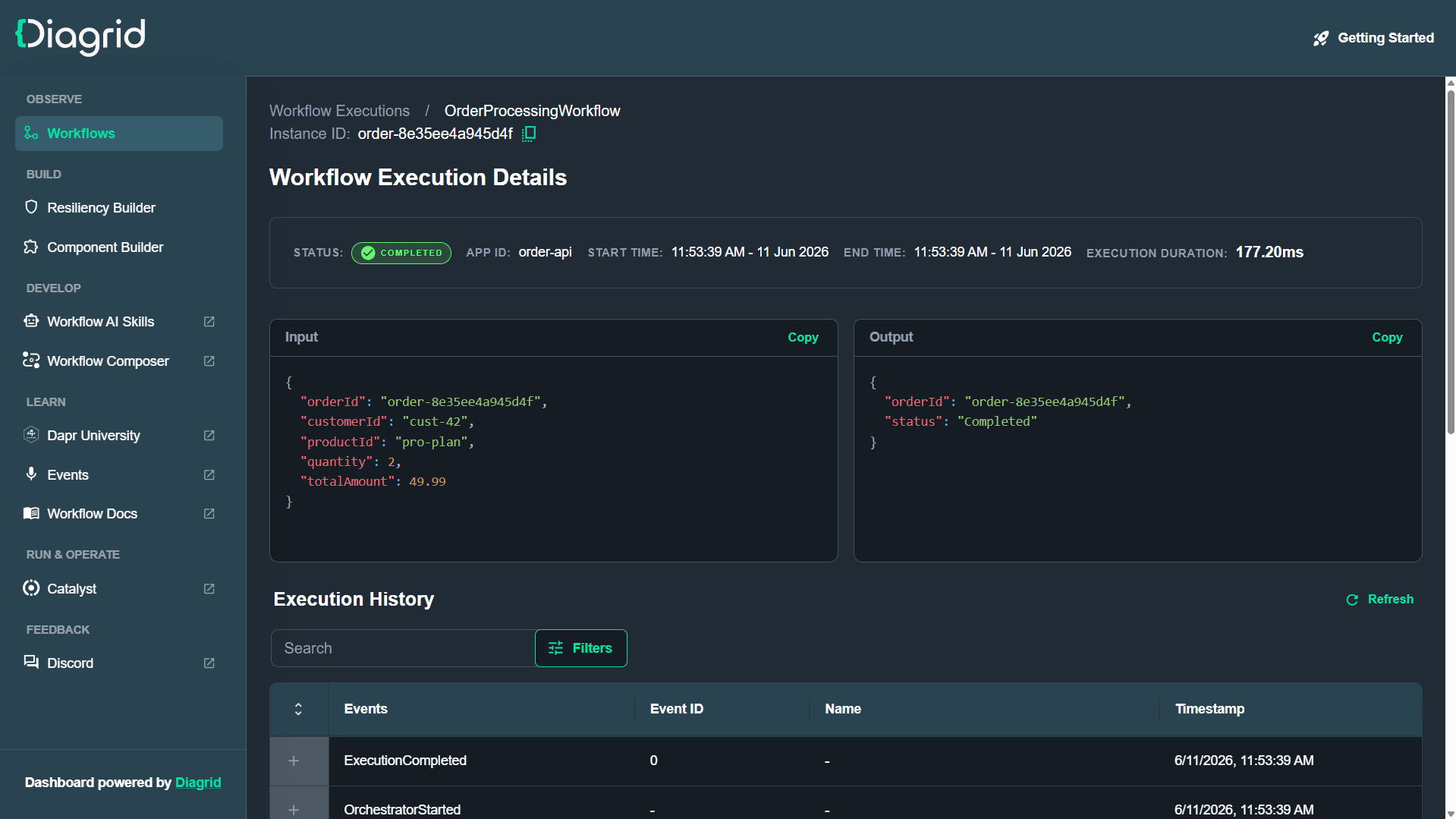
Below that sits the full execution history - the ground truth of what your workflow actually did.
Expand a TaskScheduled event to see an activity's input, or a TaskCompleted event to see its input and output:
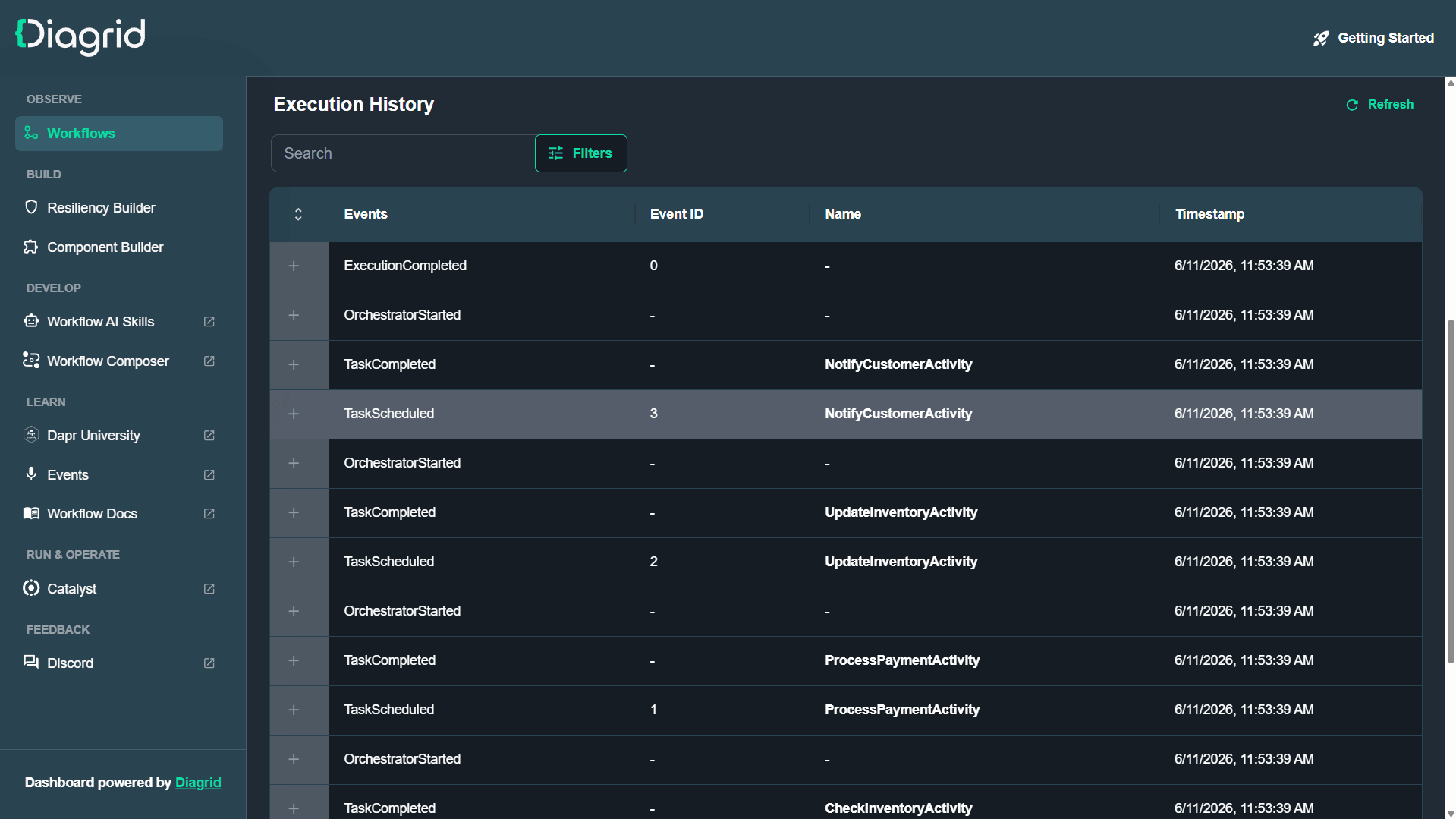
Being able to see the workflow's actual state, not just guess at it from logs, is what makes local workflow development feel sane.
There's also a Diagrid.Aspire.Hosting.Dashboard package that wraps this container setup into a single AddDiagridDashboard call.
Summary
Dapr Workflow gives you durable execution for long-running processes without dragging a heavy orchestration engine into your code:
- The process is plain C# code that reads top to bottom.
- Dapr makes it fault-tolerant, replaying from the state store so a crash never loses progress.
- The orchestration stays deterministic; the side effects live in activities.
- Aspire runs the sidecar, the state store, and the dashboard with one command.
- The Diagrid Dev Dashboard shows you exactly what each instance is doing.
You can grab the complete source code for this article on my GitHub, including Aspire integration tests for the workflow.
If you want to go deeper, the free Build Dapr Workflows in .NET with Aspire track on Dapr University is the natural next step. You'll build a fan-out/fan-in workflow on this exact stack in a hosted sandbox, with nothing to install. The Dapr Workflow track covers the remaining patterns in standalone examples.
Thanks for reading.
And stay awesome!
Frequently Asked Questions
What is Dapr Workflow?
Dapr Workflow is a Dapr building block for long-running business processes. You write the process as ordinary C# code and Dapr makes it durable: the workflow engine in the sidecar records every step to a state store, so a crash or restart never loses progress.
Why must Dapr workflow code be deterministic?
Dapr replays a workflow from its recorded history, so the code must produce the same decisions every time. No DateTime.Now, random values, or I/O in the workflow itself; anything non-deterministic belongs in an activity, and logging needs a replay-safe logger.
What is the difference between a workflow and an activity in Dapr?
The workflow orchestrates the process while activities do the actual work, like calling a database or sending an email. Activities are the only place non-determinism is allowed, they support constructor injection, and Dapr can retry a failed activity without re-running the whole workflow.
How does a Dapr workflow survive a process crash?
CallActivityAsync schedules work with the workflow engine, which records each result in the state store. After a crash, Dapr replays the workflow, feeds it the recorded results for completed steps, and resumes where it stopped, so a payment step never runs twice.
Why does Dapr Workflow need an actor state store?
Dapr Workflow runs on top of Dapr actors, so the state store component must declare actorStateStore: true in its YAML. Without that line, workflows won't run. It is the most commonly forgotten piece of the setup.
How do you run Dapr with .NET Aspire?
Use the CommunityToolkit.Aspire.Hosting.Dapr package (the original Aspire.Hosting.Dapr package is deprecated), attach a sidecar with WithDaprSidecar, point ResourcesPaths at your Dapr component files, and add a state store like Valkey. A single aspire run command then starts everything.