

.slnx is Microsoft's XML-based solution format: a plain list of projects and folders that reads like a .csproj and drops the GUID blocks that cause merge conflicts.
With the .NET 9 SDK (9.0.200 or later), dotnet sln migrate generates a .slnx next to your existing .sln.
Delete the old .sln afterwards.
Your GitHub Actions job says "waiting for a runner" but the runner is online and idle. Depot breaks down why error messages mislead you and how workflow permissions, authentication, and security contexts cause failures that look like infrastructure problems. See what's really breaking your builds.
Rider 2025.3 is now available with day-one support for .NET 10, C# 14, and a completely new default UI. Experience faster startup times and the latest coding features in your favorite cross-platform IDE. Learn more here.
Solution files have always been that one file nobody wants to touch during a merge conflict. I still remember the pain of resolving conflicts in large monorepo solutions with hundreds of projects. Can I just say this was not fun?
Microsoft is (finally!) addressing that with .slnx: an XML-based, simpler solution format designed to be easier to read, edit, and merge.
Here is your practical guide to the future of .NET solutions.
The problem with .sln
Classic .sln files are verbose: GUID-heavy project entries + configuration blocks that explode as your solution grows.
It's also a frequent source of merge conflicts.
To appreciate the new format, we must look at the old one.
Here's a typical .sln file from a moderately sized .NET solution:
Microsoft Visual Studio Solution File, Format Version 12.00
# Visual Studio Version 17
VisualStudioVersion = 17.7.34031.279
MinimumVisualStudioVersion = 10.0.40219.1
Project("{2150E333-8FDC-42A3-9474-1A3956D46DE8}") = "Solution Items", "Solution Items", "{8FC526EA-218B-4615-8410-4E1850611F38}"
	ProjectSection(SolutionItems) = preProject
		.editorconfig = .editorconfig
		Directory.Build.props = Directory.Build.props
		Directory.Packages.props = Directory.Packages.props
	EndProjectSection
EndProject
Project("{2150E333-8FDC-42A3-9474-1A3956D46DE8}") = "src", "src", "{64A28C1B-09AF-426E-8721-D002BE554B48}"
EndProject
Project("{9A19103F-16F7-4668-BE54-9A1E7A4F7556}") = "SharedKernel", "src\SharedKernel\SharedKernel.csproj", "{166778A2-518F-47F0-BBC7-DB49C76A963C}"
EndProject
Project("{9A19103F-16F7-4668-BE54-9A1E7A4F7556}") = "Domain", "src\Domain\Domain.csproj", "{6448ADE8-34BC-4F2F-A68C-5B2D6BF4FB0B}"
EndProject
Project("{9A19103F-16F7-4668-BE54-9A1E7A4F7556}") = "Application", "src\Application\Application.csproj", "{0F576D4A-156D-4626-A4D5-83DD0F6FAFE7}"
EndProject
Project("{9A19103F-16F7-4668-BE54-9A1E7A4F7556}") = "Infrastructure", "src\Infrastructure\Infrastructure.csproj", "{C699FD09-4D82-4C4B-8744-4FD3B0D60EFC}"
EndProject
Project("{9A19103F-16F7-4668-BE54-9A1E7A4F7556}") = "Web.Api", "src\Web.Api\Web.Api.csproj", "{86506D03-3746-41E7-A645-97D3633981DB}"
EndProject
Project("{2150E333-8FDC-42A3-9474-1A3956D46DE8}") = "tests", "tests", "{1EB88D85-BE1E-46DE-99A2-2F02363060AF}"
EndProject
Project("{9A19103F-16F7-4668-BE54-9A1E7A4F7556}") = "ArchitectureTests", "tests\ArchitectureTests\ArchitectureTests.csproj", "{8D8E2A8A-D3FE-4230-BEF7-C427D6BD87DA}"
EndProject
Project("{E53339B2-1760-4266-BCC7-CA923CBCF16C}") = "docker-compose", "docker-compose.dcproj", "{34BB3069-D5D0-4046-ACAD-A2025ED7678F}"
EndProject
Global
	GlobalSection(SolutionConfigurationPlatforms) = preSolution
		Debug|Any CPU = Debug|Any CPU
		Release|Any CPU = Release|Any CPU
	EndGlobalSection
	GlobalSection(ProjectConfigurationPlatforms) = postSolution
		{166778A2-518F-47F0-BBC7-DB49C76A963C}.Debug|Any CPU.ActiveCfg = Debug|Any CPU
		{166778A2-518F-47F0-BBC7-DB49C76A963C}.Debug|Any CPU.Build.0 = Debug|Any CPU
		{166778A2-518F-47F0-BBC7-DB49C76A963C}.Release|Any CPU.ActiveCfg = Release|Any CPU
		{166778A2-518F-47F0-BBC7-DB49C76A963C}.Release|Any CPU.Build.0 = Release|Any CPU
		{6448ADE8-34BC-4F2F-A68C-5B2D6BF4FB0B}.Debug|Any CPU.ActiveCfg = Debug|Any CPU
		{6448ADE8-34BC-4F2F-A68C-5B2D6BF4FB0B}.Debug|Any CPU.Build.0 = Debug|Any CPU
		{6448ADE8-34BC-4F2F-A68C-5B2D6BF4FB0B}.Release|Any CPU.ActiveCfg = Release|Any CPU
		{6448ADE8-34BC-4F2F-A68C-5B2D6BF4FB0B}.Release|Any CPU.Build.0 = Release|Any CPU
		{0F576D4A-156D-4626-A4D5-83DD0F6FAFE7}.Debug|Any CPU.ActiveCfg = Debug|Any CPU
		{0F576D4A-156D-4626-A4D5-83DD0F6FAFE7}.Debug|Any CPU.Build.0 = Debug|Any CPU
		{0F576D4A-156D-4626-A4D5-83DD0F6FAFE7}.Release|Any CPU.ActiveCfg = Release|Any CPU
		{0F576D4A-156D-4626-A4D5-83DD0F6FAFE7}.Release|Any CPU.Build.0 = Release|Any CPU
		{C699FD09-4D82-4C4B-8744-4FD3B0D60EFC}.Debug|Any CPU.ActiveCfg = Debug|Any CPU
		{C699FD09-4D82-4C4B-8744-4FD3B0D60EFC}.Debug|Any CPU.Build.0 = Debug|Any CPU
		{C699FD09-4D82-4C4B-8744-4FD3B0D60EFC}.Release|Any CPU.ActiveCfg = Release|Any CPU
		{C699FD09-4D82-4C4B-8744-4FD3B0D60EFC}.Release|Any CPU.Build.0 = Release|Any CPU
		{86506D03-3746-41E7-A645-97D3633981DB}.Debug|Any CPU.ActiveCfg = Debug|Any CPU
		{86506D03-3746-41E7-A645-97D3633981DB}.Debug|Any CPU.Build.0 = Debug|Any CPU
		{86506D03-3746-41E7-A645-97D3633981DB}.Release|Any CPU.ActiveCfg = Release|Any CPU
		{86506D03-3746-41E7-A645-97D3633981DB}.Release|Any CPU.Build.0 = Release|Any CPU
		{8D8E2A8A-D3FE-4230-BEF7-C427D6BD87DA}.Debug|Any CPU.ActiveCfg = Debug|Any CPU
		{8D8E2A8A-D3FE-4230-BEF7-C427D6BD87DA}.Debug|Any CPU.Build.0 = Debug|Any CPU
		{8D8E2A8A-D3FE-4230-BEF7-C427D6BD87DA}.Release|Any CPU.ActiveCfg = Release|Any CPU
		{8D8E2A8A-D3FE-4230-BEF7-C427D6BD87DA}.Release|Any CPU.Build.0 = Release|Any CPU
		{34BB3069-D5D0-4046-ACAD-A2025ED7678F}.Debug|Any CPU.ActiveCfg = Debug|Any CPU
		{34BB3069-D5D0-4046-ACAD-A2025ED7678F}.Debug|Any CPU.Build.0 = Debug|Any CPU
		{34BB3069-D5D0-4046-ACAD-A2025ED7678F}.Release|Any CPU.ActiveCfg = Release|Any CPU
		{34BB3069-D5D0-4046-ACAD-A2025ED7678F}.Release|Any CPU.Build.0 = Release|Any CPU
	EndGlobalSection
	GlobalSection(SolutionProperties) = preSolution
		HideSolutionNode = FALSE
	EndGlobalSection
	GlobalSection(NestedProjects) = preSolution
		{166778A2-518F-47F0-BBC7-DB49C76A963C} = {64A28C1B-09AF-426E-8721-D002BE554B48}
		{6448ADE8-34BC-4F2F-A68C-5B2D6BF4FB0B} = {64A28C1B-09AF-426E-8721-D002BE554B48}
		{0F576D4A-156D-4626-A4D5-83DD0F6FAFE7} = {64A28C1B-09AF-426E-8721-D002BE554B48}
		{C699FD09-4D82-4C4B-8744-4FD3B0D60EFC} = {64A28C1B-09AF-426E-8721-D002BE554B48}
		{86506D03-3746-41E7-A645-97D3633981DB} = {64A28C1B-09AF-426E-8721-D002BE554B48}
		{8D8E2A8A-D3FE-4230-BEF7-C427D6BD87DA} = {1EB88D85-BE1E-46DE-99A2-2F02363060AF}
	EndGlobalSection
	GlobalSection(ExtensibilityGlobals) = postSolution
		SolutionGuid = {B948A3CC-9872-4612-ABD2-BB3D49671542}
	EndGlobalSection
EndGlobal
Good luck trying to make sense of that during a merge conflict!
What .slnx looks like
A minimal .slnx is basically a list of projects in XML.
Here's the same solution as above, but in .slnx format.
We even have solution items, folders, and a docker-compose project.
<Solution>
  <Folder Name="/Solution Items/">
    <File Path=".editorconfig" />
    <File Path="Directory.Build.props" />
    <File Path="Directory.Packages.props" />
  </Folder>
  <Folder Name="/src/">
    <Project Path="src/Application/Application.csproj" />
    <Project Path="src/Domain/Domain.csproj" />
    <Project Path="src/Infrastructure/Infrastructure.csproj" />
    <Project Path="src/SharedKernel/SharedKernel.csproj" />
    <Project Path="src/Web.Api/Web.Api.csproj" />
  </Folder>
  <Folder Name="/tests/">
    <Project Path="tests/ArchitectureTests/ArchitectureTests.csproj" />
  </Folder>
  <Project Path="docker-compose.dcproj">
    <Build />
  </Project>
</Solution>
It looks remarkably similar to a .csproj file.
How to Migrate Today
The .slnx format is available in recent versions of Visual Studio 2022 (v17.13+) and the .NET 9 SDK. Here is how you can switch.
Option 1: The Command Line
If you have the .NET 9 SDK installed (specifically 9.0.200 or later), you can migrate instantly via the CLI.
-
Open your terminal in the solution folder.
-
Run the migration command:
dotnet sln migrate -
This creates a new
.slnxfile alongside your old.sln.
At this point I would recommend deleting the old .sln file to avoid confusion.
There's no point in keeping both in the same repo.
Option 2: Visual Studio "Save As"
If you prefer the GUI, you can do this directly inside Visual Studio 2022 (or 2026).
-
Select the Solution in the Solution Explorer.
-
Go to
File>Save Solution As....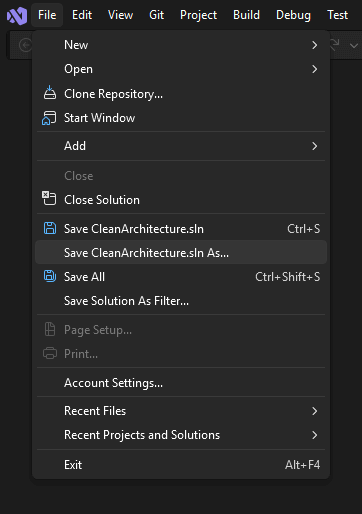
-
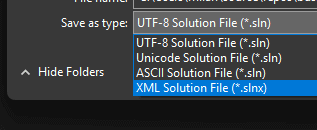
Change the "Save as type" dropdown to Xml Solution File (*.slnx).
Why You Should Care
- Fewer Merge Conflicts: The #1 benefit. Because the file is simple XML without random GUIDs changing, git merges become trivial.
- Human Readable: You can open this in Notepad, understand it, and edit it without breaking your entire build.
- Consistency: It finally aligns the solution format with the project format (
.csproj), which moved to simplified XML years ago. - Performance: Smaller file sizes and simpler parsing mean slightly faster load times for massive solutions.
Is it Ready?
As of late 2025/early 2026, .slnx is technically a Preview feature.
Safe to use? Yes, the format is stable.
Tooling support? Visual Studio 2022, Visual Studio 2026 and Rider support it well. So does the .NET CLI. Some older CI/CD pipelines or 3rd party tools might not recognize the extension yet.
My recommendation: Try it on a side project or a branch first. If your CI pipeline passes, you are ready to modernize.
I'm using this format in all my new projects and have migrated several existing ones without issues.
Frequently Asked Questions
What is the .slnx solution format?
The .slnx format is an XML-based, simpler solution file format from Microsoft, designed to be easier to read, edit, and merge than the classic .sln format. A minimal .slnx is essentially a list of projects and folders in XML, and it looks remarkably similar to a .csproj file.
How do you convert a .sln file to .slnx?
With the .NET 9 SDK (9.0.200 or later), run dotnet sln migrate in the solution folder to generate a .slnx next to the old .sln. Alternatively, use Save Solution As in Visual Studio and pick the Xml Solution File type. Delete the old .sln afterwards to avoid confusion.
Why does .slnx cause fewer merge conflicts than .sln?
Classic .sln files are verbose, GUID-heavy, and full of configuration blocks that explode as the solution grows. The .slnx format is simple XML without random GUIDs changing between edits, so git merges become trivial and you can read and edit the file by hand without breaking the build.
Is the .slnx format ready for production use?
As of late 2025, .slnx was technically a Preview feature, but the format itself was stable. Visual Studio 2022 (17.13+), Visual Studio 2026, Rider, and the .NET CLI supported it well, while some older CI/CD pipelines and third-party tools did not recognize the extension yet.
Should you keep both .sln and .slnx in the same repository?
No. After migrating, delete the old .sln file. Keeping both formats in the same repo adds confusion with no benefit. A safe rollout is to try .slnx on a side project or a branch first and confirm your CI pipeline passes before committing to it.