Each SignalR server only knows about the connections it accepted, so once you scale out, messages for clients on another instance are silently dropped. A Redis backplane fixes that by publishing every message to a shared channel that all instances subscribe to. You still need sticky sessions, and nothing is buffered while Redis is down.
Get design and reference implementation for secure deployment of AI agents on infrastructure. Teleport's Agentic Identity Framework provides standards-based, opinionated designs so teams can ship confidently. Check it out.
Don't gamble with AI Agents. Coder Workspace provides a secure, self-hosted environment, so you can leverage AI safely, collaborate effectively, and stay in control. Learn more.
I ran into this one the hard way.
I built a real-time notification feature with SignalR, tested it locally, everything worked great. Then I scaled to two instances behind a load balancer, and notifications started disappearing for some users.
The code was fine. The problem was that SignalR connections are bound to the server process that accepted them. Each instance only knows about its own connections. So when an API request lands on Server 1 but the user is connected to Server 2, the notification just... doesn't get delivered.
This is the SignalR scale-out problem, and it bites almost everyone who goes from one instance to more.
Why SignalR Breaks When You Scale Out
With a single instance, everything just works.
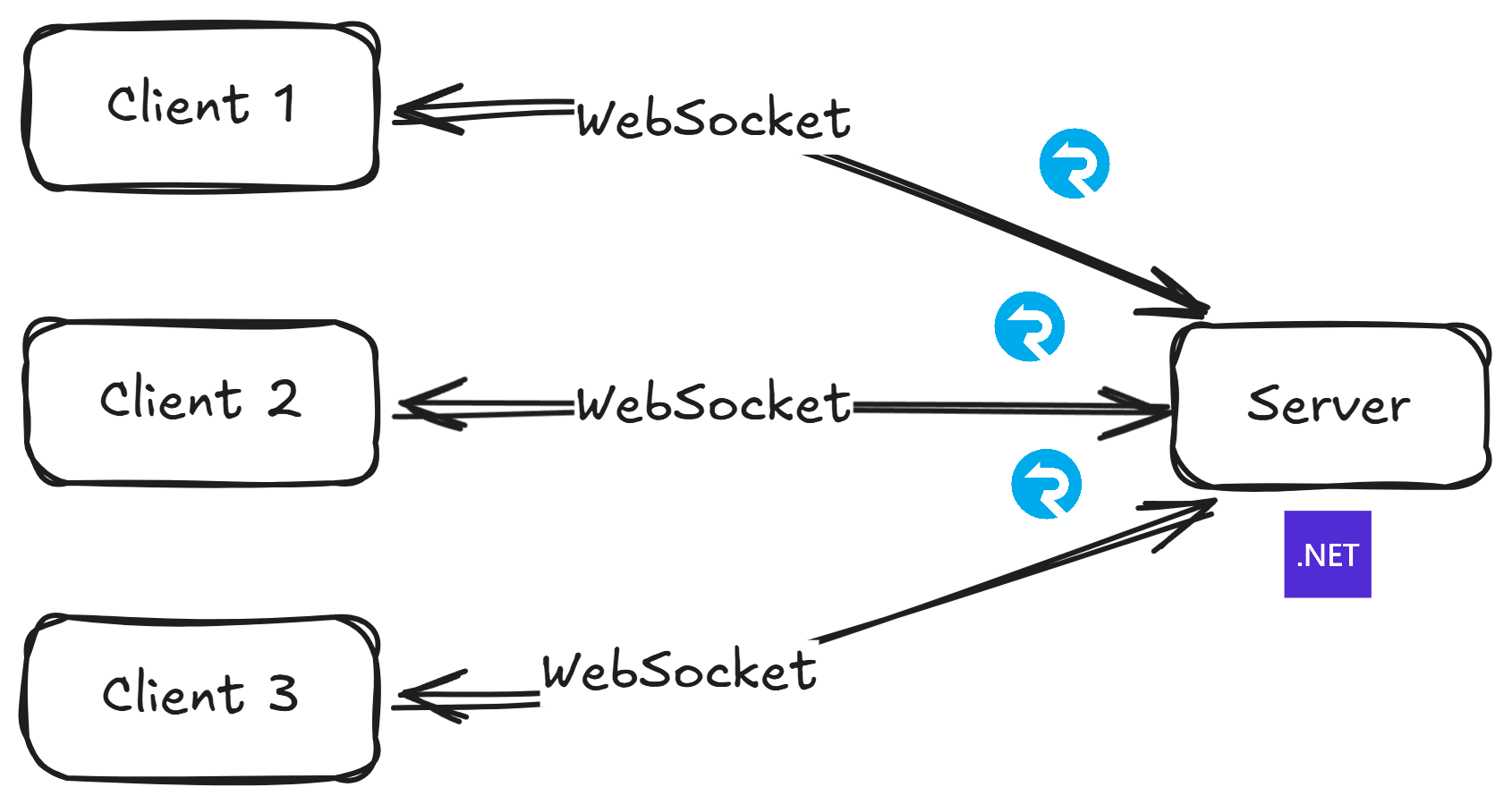
The server holds the full map of who's connected, so sending a message to a user, a group, or all clients works because that map is complete.
But scale out to two or more instances, and that map fractures.
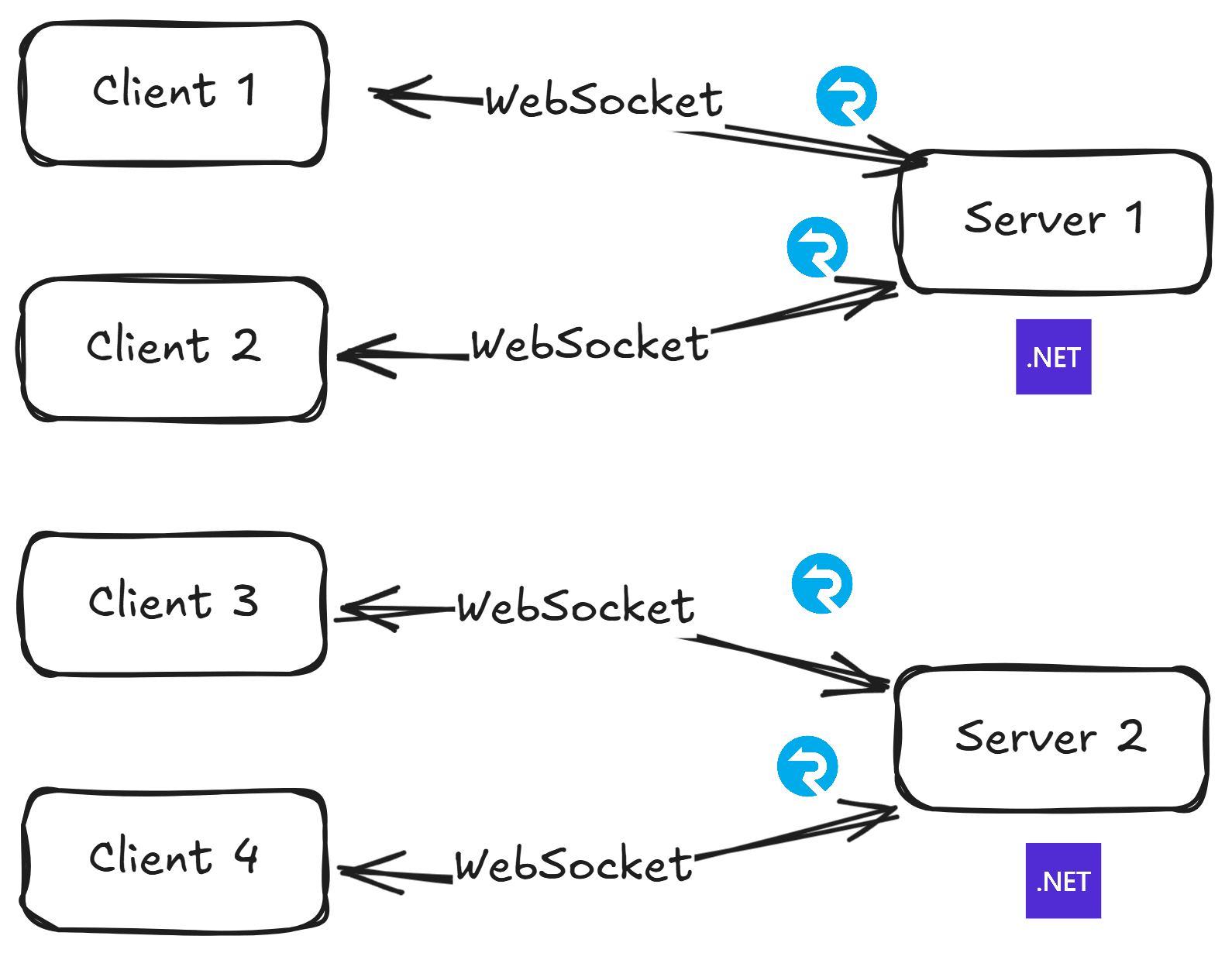
Server 1 has no idea Client 3 or Client 4 even exist. So when an order status change happens on Server 1 and needs to reach Client 3, Server 1 checks its connection map, finds nothing, and the message is quietly dropped.
The Backplane Pattern
The fix is a backplane - a shared messaging layer that sits between all your server instances.
Every server publishes outgoing messages to a central channel, and every server subscribes to that same channel. When a message comes in, each server checks if any of its local connections should receive it.
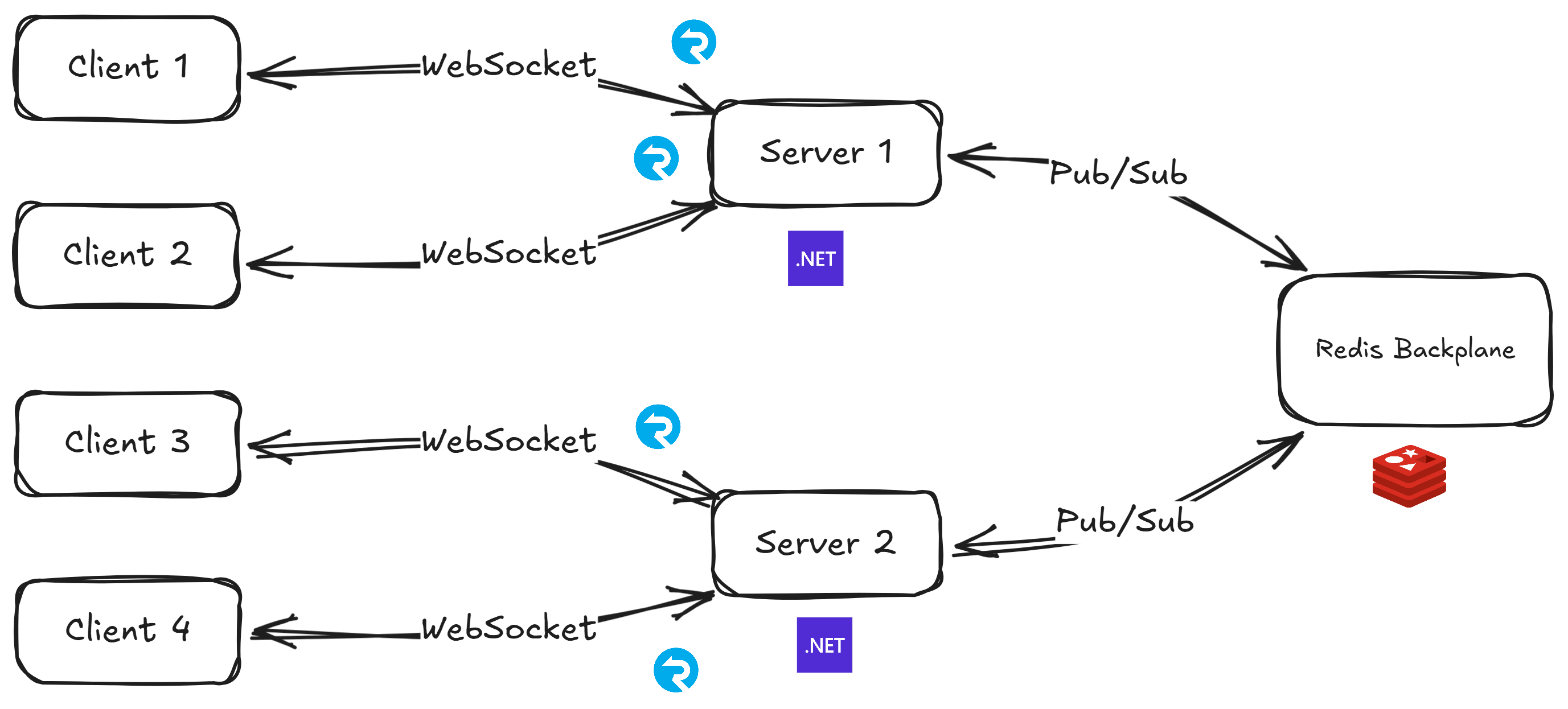
When Server 1 wants to notify Client 3:
- Server 1 publishes the message to the backplane
- All servers receive the message
- Server 2 recognizes Client 3 as one of its connections and delivers the notification
From your code's perspective, it looks like every server can see every connection. Redis works really well for this because its Pub/Sub delivers messages to all subscribers in near real-time. And if you're already using Redis for distributed caching, you don't even need to spin up anything new.
Setting It Up
Let me walk through how I set this up in an order notification system. Clients connect to a SignalR hub, authenticate via JWT, and get real-time status updates when an order changes.
Install the NuGet Package
dotnet add package Microsoft.AspNetCore.SignalR.StackExchangeRedis
Register the Backplane
Chain .AddStackExchangeRedis() onto your AddSignalR() call:
builder.Services.AddSignalR()
    .AddStackExchangeRedis(builder.Configuration.GetConnectionString("cache")!);
If you're running with .NET Aspire, you will have the Redis connection string registered via environment variables, so you can just pull it from configuration. Reference the same named connection:
builder.AddRedisDistributedCache("cache");

builder.Services.AddSignalR()
    .AddStackExchangeRedis(builder.Configuration.GetConnectionString("cache")!);
If you have multiple SignalR apps sharing the same Redis instance, you'll want to add a channel prefix. Otherwise, messages from one app will reach subscribers in every app on that Redis server.
builder.Services.AddSignalR()
    .AddStackExchangeRedis(connectionString, options =>
    {
        options.Configuration.ChannelPrefix = RedisChannel.Literal("OrderNotifications");
    });
The nice thing is that your IHubContext<> call site doesn't change at all.
Clients.User(...) works the same whether you have one instance or ten - the backplane handles routing behind the scenes.
When I tested this with two replicas in .NET Aspire, I tagged each notification with the sending instance's ID. A client on Replica 1 received a notification stamped with Replica 2's ID, which confirmed the message was crossing instances through Redis.
The Sticky Sessions Requirement
This is something you should know before you set up the backplane: you still need sticky sessions.
The Redis backplane solves message routing, but it does not remove the need for sticky sessions.
SignalR's connection negotiation is a two-step process:
- The client sends a
POSTto/hub/negotiateto obtain a connection token - The client uses that token to establish the WebSocket connection
Both requests must land on the same server. If your load balancer routes the negotiation to Server 1 but the WebSocket upgrade to Server 2, the connection fails.
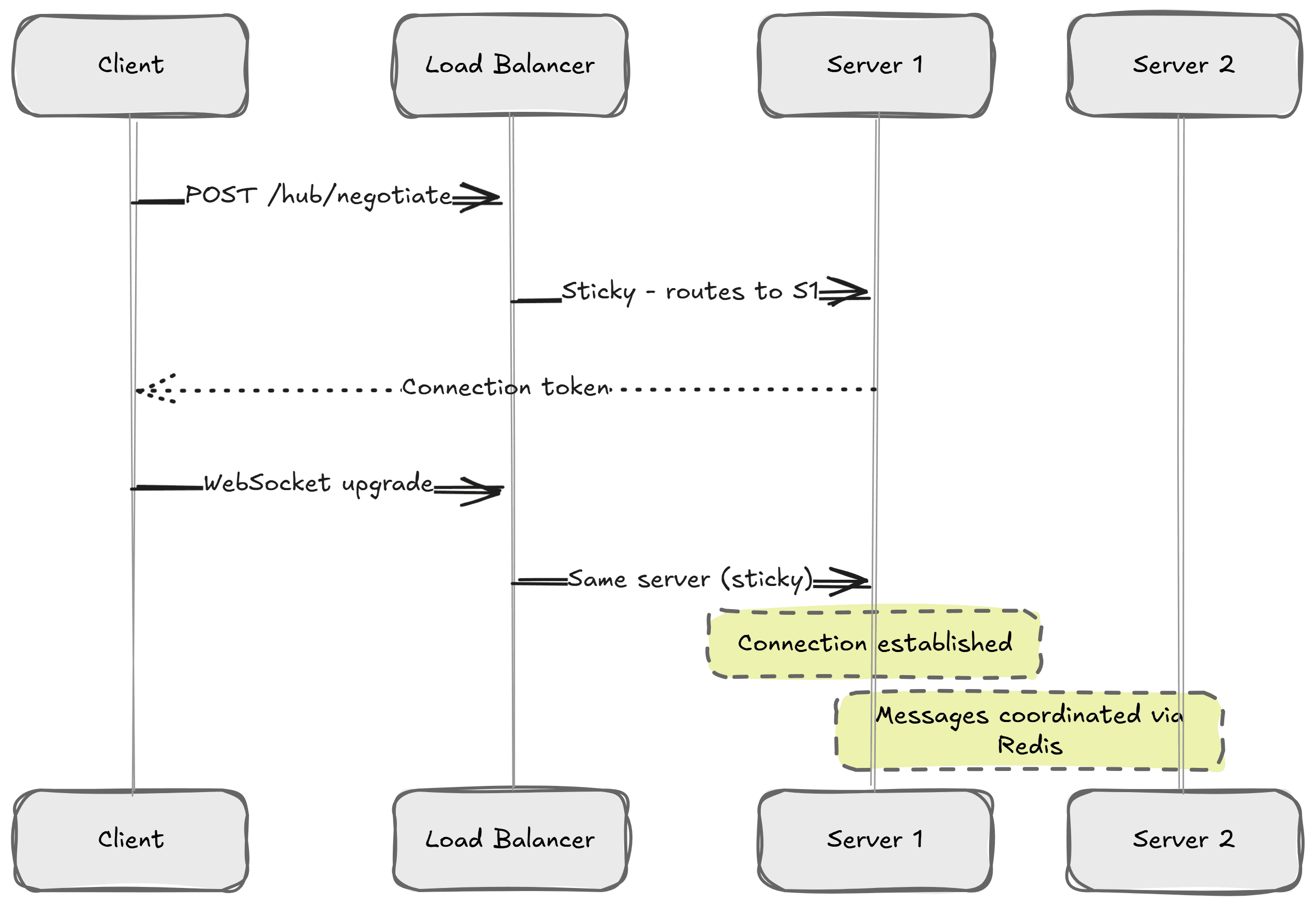
Make sure sticky sessions are enabled in your load balancer. Most load balancers support this via IP hash or cookie affinity - check the docs for whichever you're using.
What Happens When Redis Goes Down?
One thing worth knowing: SignalR does not buffer messages when Redis is unavailable.
If Redis stops responding, any messages sent during the outage are simply lost. SignalR may throw exceptions, but your existing WebSocket connections stay open - clients don't get disconnected. Once Redis comes back, SignalR reconnects automatically.
For most real-time scenarios like order updates or live dashboards, this is fine. The next state change triggers a fresh notification anyway, or the user can just reload. If you're dealing with something more critical (financial data, operational alerts), you'll want a reconciliation strategy on reconnect or a durable queue running alongside.
Redis Backplane vs. Azure SignalR Service
If you're on Azure, the managed Azure SignalR Service is worth considering. It proxies all client connections through the service, so sticky sessions aren't required and your servers only hold a small number of constant connections to the service.
The Redis backplane is the better fit when you're self-hosted, latency-sensitive, or already running Redis. For everything else, Azure SignalR Service is the cleaner option.
Summary
Honestly, the Redis backplane is almost too simple to set up.
One method call on AddSignalR() and your app goes from silently dropping messages to routing them across every instance.
You don't need to make changes to your hub code, client code, or application logic.
Just remember two things:
- You still need sticky sessions
- Messages aren't buffered if Redis goes down temporarily
Get those two right and SignalR scales out just as smoothly as the rest of your stack.
If you want to go deeper on building real-time features and APIs in .NET, check out my Pragmatic REST APIs course.
Hope this was useful. See you next week.
Frequently Asked Questions
Why does SignalR stop working when you scale to multiple servers?
SignalR connections are bound to the server process that accepted them, so each instance only knows about its own connections. When a message originates on one server for a client connected to another, the sender finds nothing in its connection map and the message is quietly dropped.
What is a SignalR backplane?
A backplane is a shared messaging layer between all server instances. Every server publishes outgoing messages to a central channel and subscribes to it, then delivers messages meant for its local connections. From your code, it looks like every server can see every connection.
How do you set up a Redis backplane for SignalR in .NET?
Install the Microsoft.AspNetCore.SignalR.StackExchangeRedis package and chain AddStackExchangeRedis with your Redis connection string onto AddSignalR. Hub and client code stay unchanged. If multiple SignalR apps share one Redis instance, set a ChannelPrefix so messages stay scoped to each app.
Do you still need sticky sessions with a Redis backplane?
Yes. The backplane solves message routing, not connection negotiation. SignalR's negotiate request and the following WebSocket connection must land on the same server, so enable sticky sessions in your load balancer through IP hash or cookie affinity.
What happens to SignalR messages when Redis goes down?
SignalR does not buffer messages during a Redis outage, so anything sent while Redis is unavailable is lost. Existing WebSocket connections stay open, and SignalR reconnects automatically once Redis returns. For critical data, add a reconciliation strategy on reconnect or a durable queue.
Should I use a Redis backplane or Azure SignalR Service?
The Redis backplane is the better fit when you are self-hosted, latency-sensitive, or already running Redis. Azure SignalR Service proxies all client connections through the managed service, removes the sticky sessions requirement, and is the cleaner option on Azure.