
DbContext is not thread-safe, because it tracks changes and wraps a single database connection.
Running two queries on it at the same time throws "A second operation started on this context".
Inject IDbContextFactory<T> and create a fresh context inside each parallel task, so every query gets its own connection.
AI is changing observability, but dashboards aren't dead. Honeycomb explains why human context still wins and where AI adds real value. See why your dashboard isn't going anywhere... yet.
Build AI Apps with MongoDB
Looking to stay ahead of the curve on AI?
MongoDB AI Learning Hub has the technical training pathways and tools you need to uplevel your AI app-building game.
Explore practical guides, tutorials, and quick starts for all skills levels,
from foundational concepts like understanding AI tool stacks to advanced implementations using RAG, Atlas Vector Search, and LLM optimization.
We have all built that endpoint.
You know the one: the "Executive Dashboard" or the "User Summary" screen. It's the endpoint that needs to fetch three or four completely unrelated sets of data to paint a complete picture for the user. It needs the last 50 orders, the current system health logs, the user's profile settings, and maybe a notification count.
So, you write the code the standard way:
var orders = await GetRecentOrdersAsync(userId);
var logs = await GetSystemLogsAsync();
var stats = await GetUserStatsAsync(userId);

return new DashboardDto(orders, logs, stats);
This works. It's clean. It's readable. But there is a problem.
If GetRecentOrdersAsync takes 300ms, GetSystemLogsAsync takes 400ms, and GetUserStatsAsync takes 300ms,
your users are staring at a loading spinner for 1 full second (300 + 400 + 300).
In a distributed system, latency kills user experience. Since these data sets are unrelated, we should be able to run them in parallel. If we did, the total time would only be the duration of the slowest query (400ms). That is a 60% performance improvement just by changing how we execute the code.
But if you try the naive approach with Entity Framework Core, your application will crash.
The False Promise of Task.WhenAll
The most common mistake developers make when trying to optimize this is wrapping their existing repository calls in tasks and waiting for them all at once.
It looks something like this:
// ❌ DO NOT DO THIS
public async Task<DashboardData> GetDashboardData(int userId)
{
    // These methods all use the same injected _dbContext
    var ordersTask = _repository.GetOrdersAsync(userId);
    var logsTask = _repository.GetLogsAsync();
    var statsTask = _repository.GetStatsAsync(userId);

    await Task.WhenAll(ordersTask, logsTask, statsTask); // BOOM 💥

    return new DashboardData(ordersTask.Result, logsTask.Result, statsTask.Result);
}
If you run this, you will immediately hit this dreaded exception:
A second operation started on this context before a previous operation completed. This is usually caused by different threads using the same instance of DbContext, however instance members are not guaranteed to be thread safe.
Why does this happen?
The DbContext in EF Core is not thread-safe.
It is a stateful object designed to manage a single unit of work.
It maintains a "Change Tracker" to keep track of the entities you've loaded, and it wraps a single underlying database connection.
Database protocols (like the TCP stream for PostgreSQL or SQL Server) are generally synchronous at the connection level.
You cannot push two different SQL queries down the same wire at the exact same millisecond.
When you use Task.WhenAll, multiple threads try to grab that single connection simultaneously,
and EF Core steps in to throw the exception to prevent data corruption.
So, we have a dilemma: We want the speed of parallelism, but the DbContext forces us into sequential execution.
The Solution
Since .NET 5, EF Core has provided a first-class solution for this exact scenario: IDbContextFactory<T>.
Instead of injecting a scoped instance of your context (which lives for the entire HTTP request),
you inject a factory that allows you to create lightweight, independent instances of DbContext on demand.
Note: While using the factory is the cleanest approach for Dependency Injection,
you can also manually instantiate the context (using var context = new AppDbContext(options)) if you have access to the DbContextOptions.
First, we need to register the factory in our Program.cs.
// This registers IDbContextFactory<AppDbContext> as a Singleton (by default)
// It also registers AppDbContext as Scoped for ease of use elsewhere
builder.Services.AddDbContextFactory<AppDbContext>(options =>
{
    options.UseNpgsql(builder.Configuration.GetConnectionString("db"));
});
Now, let's refactor our slow dashboard endpoint.
Instead of injecting AppDbContext, we inject IDbContextFactory<AppDbContext>.
Inside our method, we spin up a dedicated task for each query. Inside each task, we create a brand new context, execute the query, and then immediately dispose of it.
using Microsoft.EntityFrameworkCore;

public class DashboardService(IDbContextFactory<AppDbContext> contextFactory)
{
    public async Task<DashboardDto> GetDashboardAsync(int userId)
    {
        // 1. Start the tasks (The queries start executing immediately upon invocation)
        var ordersTask = GetOrdersAsync(userId);
        var logsTask = GetSystemLogsAsync();
        var statsTask = GetUserStatsAsync(userId);

        // 2. Wait for all to complete
        await Task.WhenAll(ordersTask, logsTask, statsTask);

        // 3. Return results (using 'await Task.WhenAll' here unwraps the result cleanly)
        return new DashboardDto(
            await ordersTask,
            await logsTask,
            await statsTask
        );
    }

    private async Task<List<Order>> GetOrdersAsync(int userId)
    {
        // Create a fresh context for this specific operation
        await using var context = await contextFactory.CreateDbContextAsync();

        return await context.Orders
            .AsNoTracking()
            .Where(o => o.UserId == userId)
            .OrderByDescending(o => o.CreatedAt)
            .ThenByDescending(o => o.Amount)
            .Take(50)
            .ToListAsync();
    }

    private async Task<List<SystemLog>> GetSystemLogsAsync()
    {
        await using var context = await contextFactory.CreateDbContextAsync();

        return await context.SystemLogs
            .AsNoTracking()
            .OrderByDescending(l => l.Timestamp)
            .Take(50)
            .ToListAsync();
    }

    private async Task<UserStats?> GetUserStatsAsync(int userId)
    {
        await using var context = await contextFactory.CreateDbContextAsync();

        return await context.Users
            .Where(u => u.Id == userId)
            .Select(u => new UserStats { OrderCount = u.Orders.Count })
            .FirstOrDefaultAsync();
    }
}
Key Concepts
- Isolation: Each task gets its own DbContext. This means they get their own database connection. There is no contention.
- Disposal: Notice the await using. This is critical. As soon as the query is done, we want to dispose of that context and return the connection to the pool.
The Benchmark
To prove this works, I built a small .NET 10 app using Aspire and PostgreSQL.. Since I'm running this locally, the absolute times are very low. If I used a remote database, the times would be higher, but the speedup ratio would be similar.
Sequential Execution: ~36ms
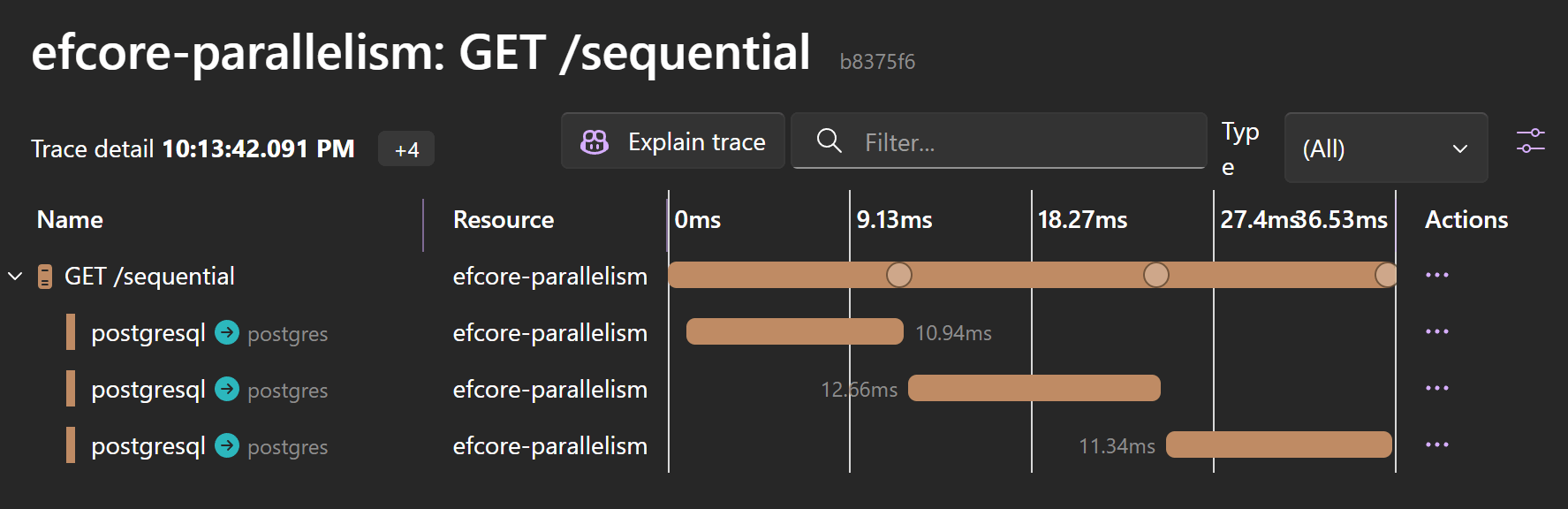
The waterfall is painfully obvious here. Each operation waits for the previous one to finish.
Parallel Execution: ~13ms
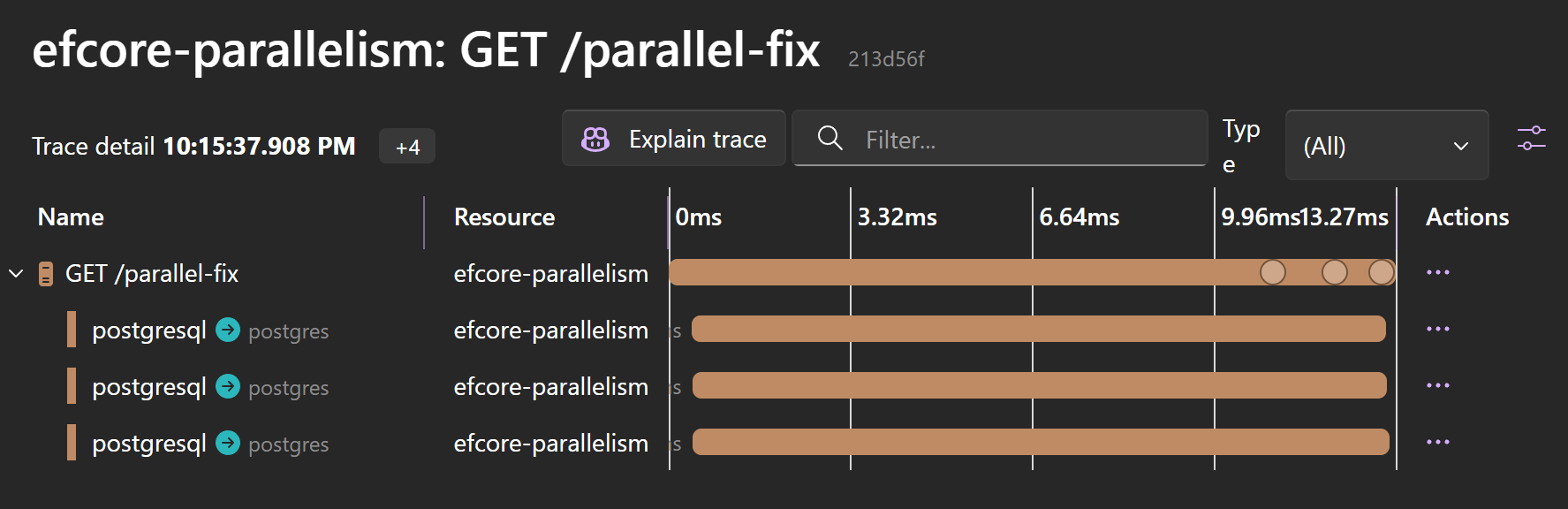
By using the parallel approach, the timeline compresses. All three database spans start at the same time and complete together.
Trade-offs & Conclusion
IDbContextFactory bridges the gap between EF Core's unit-of-work design and the reality of modern, parallel requirements.
It allows you to break out of the "one request, one thread" box without sacrificing safety.
However, use this pattern sparingly:
- Connection pool starvation: A single HTTP request now occupies 3 database connections simultaneously instead of 1. If you have high concurrency, you can easily exhaust your connection pool.
- Context overhead: If your queries are extremely fast (e.g., simple lookups by ID), the overhead of creating multiple contexts and tasks might make the parallel version slower than the sequential one.
Next time you are staring at a slow dashboard, don't reach for raw SQL immediately. Check your awaits. If they are lined up single-file, it might be time to introduce some parallelization.
Frequently Asked Questions
Why is DbContext not thread-safe in EF Core?
DbContext is a stateful object designed for a single unit of work. It maintains a change tracker and wraps one underlying database connection, and database protocols are synchronous at the connection level, so two queries cannot share the same wire simultaneously. EF Core throws instead of risking data corruption.
Why does Task.WhenAll crash when the queries share one DbContext?
Multiple threads try to use the same DbContext instance and its single database connection at once. EF Core detects this and throws 'A second operation started on this context before a previous operation completed' to prevent data corruption.
How do you run EF Core queries in parallel safely?
Inject IDbContextFactory<AppDbContext>, registered with AddDbContextFactory in Program.cs, and create a fresh context inside each parallel task with await using. Each task gets its own DbContext and its own database connection, so there is no contention, and the context is disposed as soon as the query completes.
How much faster are parallel EF Core queries?
The total time drops from the sum of all queries to the duration of the slowest one. Three queries of 300ms, 400ms, and 300ms take 1 second sequentially but 400ms in parallel, a 60% improvement. A local demo went from about 36ms sequential to about 13ms parallel.
What are the downsides of parallelizing EF Core queries?
A single HTTP request now occupies several database connections at once, so high concurrency can exhaust the connection pool. And for extremely fast queries, like simple lookups by ID, the overhead of creating extra contexts and tasks can make the parallel version slower than the sequential one.
When was IDbContextFactory added to EF Core?
EF Core has provided IDbContextFactory since .NET 5. It lets you create lightweight, independent DbContext instances on demand instead of relying on the scoped instance that lives for the whole HTTP request. You can also instantiate a context manually if you have access to DbContextOptions.


