
Tailscale connects your own machines into a single private, encrypted network called a tailnet, built on WireGuard. Every device dials outward only, so you can bind Postgres or Grafana to the machine's tailnet IP and close every inbound firewall port. Private services need no TLS certificates or reverse proxies, because WireGuard already encrypts every byte.
AI agents don't have an intelligence problem, they have a context problem. Redis Iris is a real-time context engine that transforms fragmented data into live, agent-ready context and memory. Feed your agents the right data, in the right form, at the right time. Try for free today.
Like insurance for your cloud spend: Archera insures cloud commitments on AWS/Azure/GCP; you get reservation savings without the downside. Start with $0 platform fees.
Right now, a bot is scanning the internet for your database. Not yours in particular. Every database, on every server with a public IP, around the clock. The moment something on your VPS gets a public port, you're in that game whether you meant to join or not.
And most of what runs on a server was never built to play it. The database. The admin panel. The metrics dashboard. The internal API only your other services call.
None of that is meant for the public. Yet the standard tutorial hands each one a public port anyway, and with it a second job: certificates, login pages, IP allowlists, and bots probing around the clock.
There's a better default: keep those services private, reachable only by you and by each other, and expose nothing. This issue shows you how, using Tailscale.
What Tailscale Actually Is
A VPN (virtual private network) is an encrypted tunnel between machines over the public internet. Traffic inside it stays private, even across networks you don't control.
Tailscale uses that idea to connect your own machines (PCs, servers, phones) into a single private network only your devices can see, called a tailnet. It runs on WireGuard, a modern, heavily audited encryption protocol, and manages all the keys and addresses for you.
The shape is what sets it apart from an old-school VPN. A traditional VPN is hub and spoke: every device dials one central server, and all traffic funnels through it. Tailscale builds a mesh, where every device connects directly to every other device over its own encrypted tunnel.
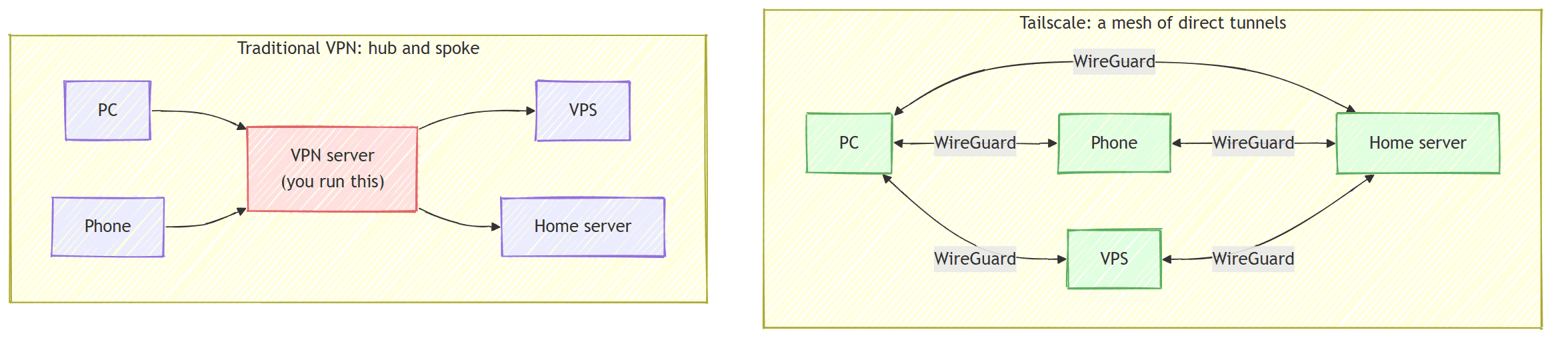
No server sits in the traffic path. Your app-to-database traffic takes the shortest route between the boxes, and there's nothing to babysit.
How do devices find each other with no server in the middle? Tailscale splits the job: a coordination server keeps a directory of your devices and their keys (a phone book), while your actual data flows directly between devices, encrypted end to end.

The key property: devices only ever dial outward, to the coordination server and to each other. Nothing has to connect inward, which is what lets us close every firewall port next.
Connecting Two VPSs With Zero Open Ports
Installing Tailscale is two commands per machine (plus the app on your PC):
curl -fsSL https://tailscale.com/install.sh | sh
sudo tailscale up
Open the login URL it prints, approve the device, and it joins your tailnet with a stable private IP (in the 100.x.y.z range) and a name that never change, on any network.
Here's the setup we'll build:
vps-app(100.64.0.2) runs a .NET API in Docker.vps-data(100.64.0.3) runs Postgres and Grafana in Docker.- The API queries Postgres across the boxes, you reach everything from your PC, and the internet sees none of it.
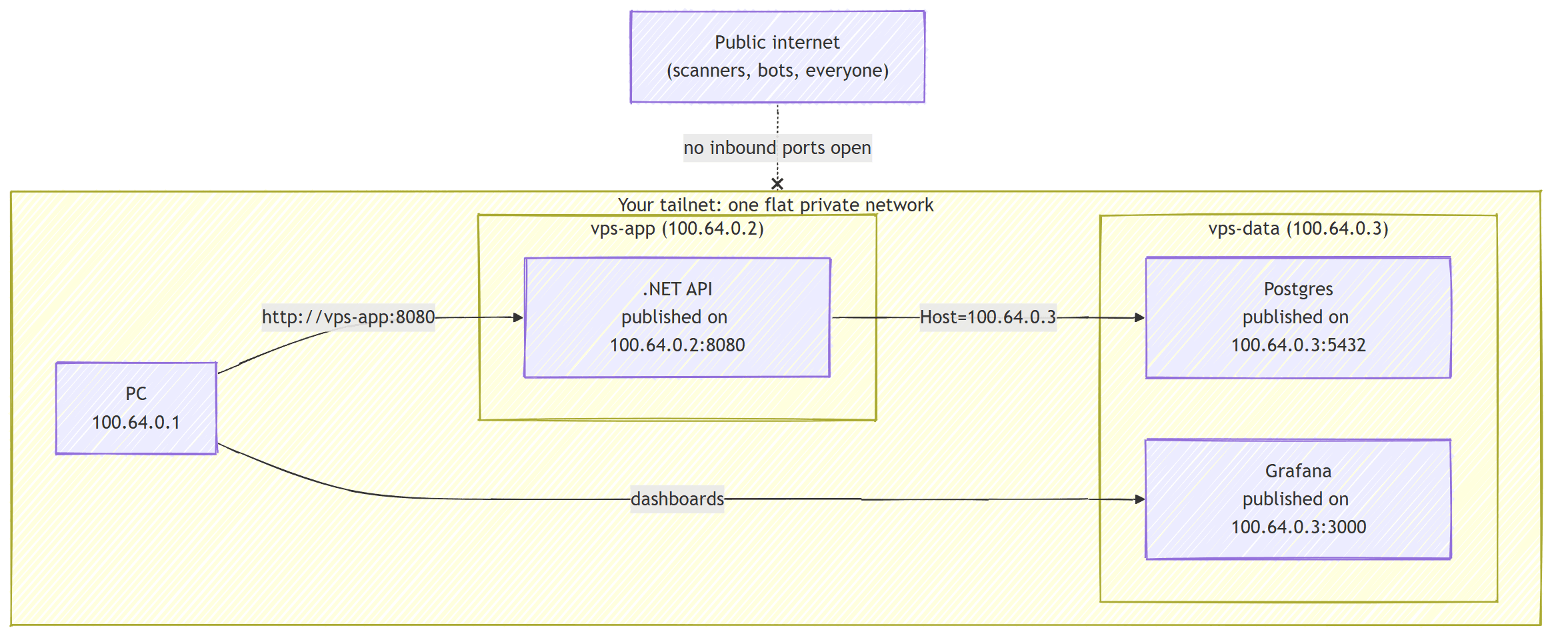
Close the firewall. Because Tailscale only dials outward, your cloud firewall needs no inbound rules to reach these boxes. Confirm SSH works over the tailnet, then delete the public port-22 rule so SSH stops existing as far as the internet is concerned.
Bind services to the tailnet IP.
This is the step that makes "zero open ports" true.
Publishing a Docker port the usual way (-p 5432:5432) binds it to 0.0.0.0, every interface.
Publish private services on the tailnet IP only instead. On vps-data:
services:
  postgres:
    image: postgres:18
    restart: unless-stopped
    environment:
      POSTGRES_PASSWORD: ${POSTGRES_PASSWORD}
    ports:
      - '100.64.0.3:5432:5432'   # tailnet IP, not 0.0.0.0
    volumes:
      - pgdata:/var/lib/postgresql/data

  grafana:
    image: grafana/grafana:12.1.0
    restart: unless-stopped
    ports:
      - '100.64.0.3:3000:3000'
    volumes:
      - grafana:/var/lib/grafana

volumes:
  pgdata:
  grafana:
Now Postgres has no public endpoint at any layer, yet every device on your tailnet reaches it.
Wire the app to the other box with an ordinary connection string pointed at the data box's stable tailnet IP:
services:
  api:
    image: ghcr.io/milanjovanovic/api:latest
    restart: unless-stopped
    ports:
      - '100.64.0.2:8080:8080'
    environment:
      ConnectionStrings__AppDb: 'Host=100.64.0.3;Port=5432;Database=app;Username=app;Password=${POSTGRES_PASSWORD}'
Then from your PC, on any network:
curl http://vps-app:8080/health
psql -h vps-data -p 5432 -U app app
Look back at everything this setup let you skip. WireGuard encrypts every byte, so TLS certificates never entered the picture. Grafana went up without a reverse proxy or a login page, and you reached each service by its tailnet name instead of a DNS record. The services run, but the internet can't see them.
The Payoff
Once your machines share one private network, every internal service (databases, queues, dashboards, admin panels, service-to-service APIs) stops being a public endpoint you have to defend. It becomes a private address you simply connect to.
This is the exact pattern I run for Katabench, the coding platform I'm building. One reverse proxy on 80 and 443 is public, because users load the app through it. Everything else (the deployment panel, Postgres, the message queue, Grafana, all the telemetry) lives on the tailnet with no public hostname at all.
The mental model that makes it stick: a public hostname is something a service has to earn, and only when an outside party genuinely must reach it. Everything else stays private by default.
Fifteen minutes of setup, zero open ports, and your infrastructure disappears from the public internet without losing an ounce of convenience.
Thanks for reading.
And stay awesome!
Frequently Asked Questions
What is Tailscale?
Tailscale connects your own machines (PCs, servers, phones) into a single private, encrypted network called a tailnet, which only your devices can see. It runs on WireGuard, a modern and heavily audited encryption protocol, and manages all keys and addresses for you.
How is Tailscale different from a traditional VPN?
A traditional VPN is hub and spoke: every device dials one central server and all traffic funnels through it. Tailscale builds a mesh where every device connects directly to every other device over its own encrypted tunnel, so no server sits in the traffic path.
Does Tailscale route my traffic through its servers?
No. The coordination server only keeps a directory of your devices and their public keys, like a phone book. Your actual data flows directly between devices through WireGuard tunnels, encrypted end to end.
How do you keep a database on a VPS off the public internet?
Bind it to the machine's tailnet IP instead of 0.0.0.0. In Docker Compose that means publishing the port as '100.64.0.3:5432:5432' rather than '5432:5432'. The database then has no public endpoint at any layer, yet every device on your tailnet can reach it.
Can you close every inbound firewall port when using Tailscale?
Yes. Tailscale devices only ever dial outward, to the coordination server and to each other, so no inbound firewall rules are needed. Confirm SSH works over the tailnet first, then delete the public port-22 rule so the internet cannot see SSH at all.
Do services on a tailnet need TLS certificates?
Not for private use. WireGuard already encrypts every byte between devices, so services like Grafana or an internal API can run without TLS certificates, reverse proxies, or login pages, reachable by their tailnet name from any of your devices.


