
Password hashing is one-way, so you cannot upgrade stored hashes in place. The zero-downtime approach is migration on login: verify with the new algorithm first, fall back to the legacy one, and re-hash the password with the new algorithm as soon as the legacy check succeeds.
Push updates live faster with RunPod
Spin up compute and storage in seconds with RunPod.
Deploy serverless inference that scales automatically, with no manual tuning or capacity planning.
Push updates live, iterate fast, and monitor everything in one place with logs, and metrics built in.
RunPod is infrastructure for AI startups and technical teams who want to stay in flow, move fast,
and spend less time on cloud plumbing and more time shipping real products.
Explore Runpod
Buf provides Protobuf tooling for schema management, validation, and code generation. Explore Buf.
Security requirements evolve. What was considered "secure enough" five years ago might not pass a security audit today.
You need to upgrade to a modern algorithm like Argon2 or Bcrypt. But here is the problem: hashing is a one-way operation. You cannot reverse-engineer the existing hashes to "upgrade" them.
If you simply swap your IPasswordHasher implementation, you break the application.
Every single existing user who tries to log in will fail authentication because your new hasher doesn't understand the old format.
In this article, I want to demo a zero-downtime migration concept in practice.
Real systems have more constraints (and you should not build auth from scratch). But this is a clean example of a pattern you can reuse for database migrations:
- Move from old format to new format
- Keep existing behavior working
- Gradually migrate data
- Delete legacy only when you are done
Let's dive in.
The Naive Approach and Why It Fails
Let's imagine you have a simple authentication system.
You want to replace your legacy PBKDF2 hasher with a standard Argon2 implementation.
You might think, "I'll just register the new implementation in the dependency injection container."
// Switching from LegacyHasher to ModernHasher
builder.Services.AddSingleton<IPasswordHasher, ModernHasher>();
Here is the failure scenario:
- New Users: They register and log in perfectly. Their passwords are hashed with Argon2 from day one.
- Existing Users: A user enters their correct password. The system fetches the old PBKDF2 hash from the database.
- The Crash: The
ModernHashertries to verify the PBKDF2 hash. It fails immediately, returning401 Unauthorized.
You have inadvertently locked out your entire user base. We need a way to support both algorithms simultaneously without making the login code a mess.
The Solution: Migration on Login
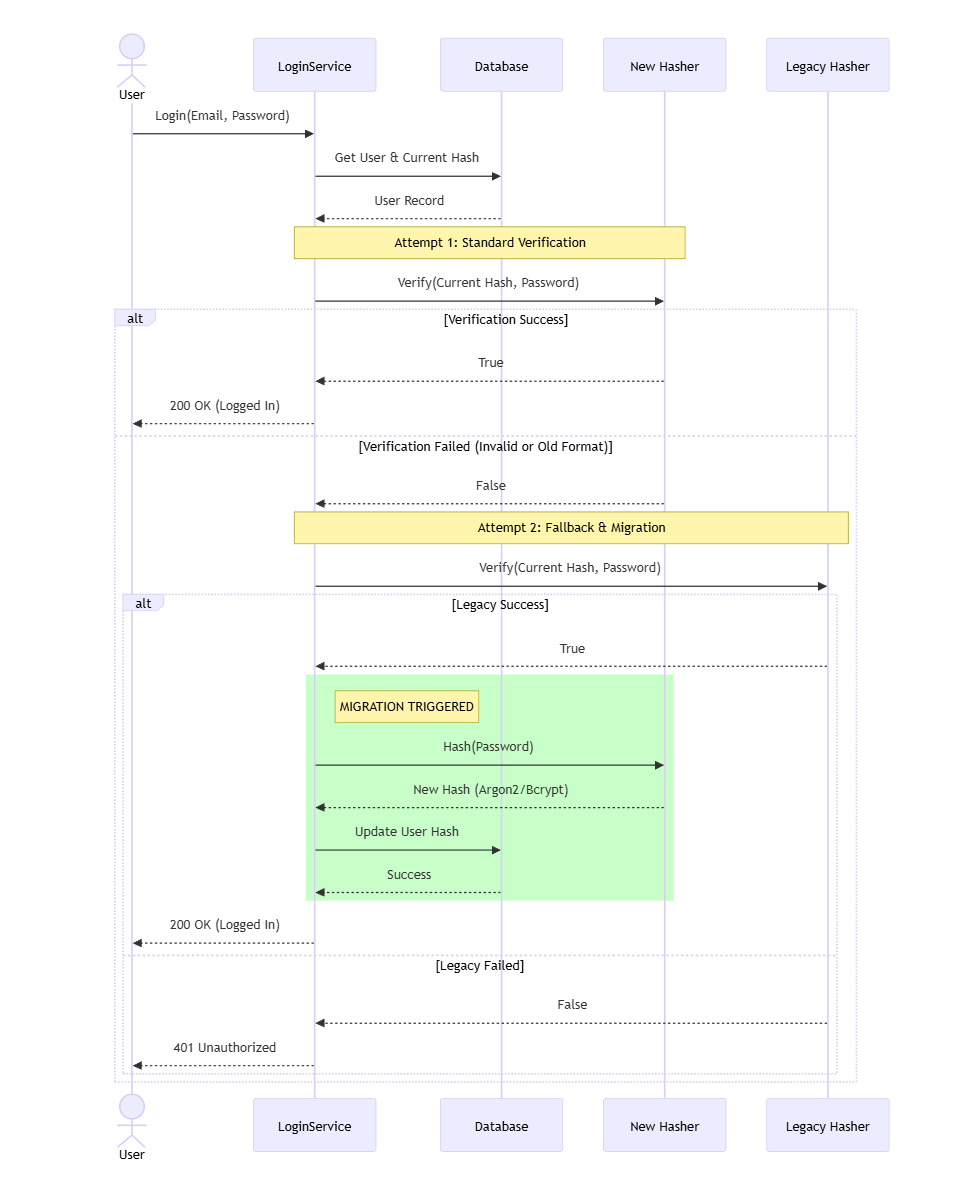
The strategy is simple: we don't migrate the database in a batch job. We migrate users lazily when they prove their identity.
The flow looks like this:
- Attempt 1: Try to verify the password using the New algorithm.
- Attempt 2 (Fallback): If that fails, check if the Legacy algorithm can verify it.
- The Migration: If the Legacy verification succeeds:
- Log the user in (Success).
- Immediately re-hash their password using the New algorithm.
- Update the database record.
Future logins for this user will now succeed via the standard flow.
Implementation with .NET Keyed Services
In .NET 8, Microsoft introduced Keyed Services, which are perfect for this scenario. They allow us to register multiple implementations of the same interface and retrieve them by name.
1. Registering the Services
We register both hashers in our Program.cs, assigning them unique keys:
// Register the implementations with specific keys
builder.Services.AddKeyedSingleton<IPasswordHasher, Pbdkf2PasswordHasher>("legacy");
builder.Services.AddKeyedSingleton<IPasswordHasher, Argon2PasswordHasher>("modern");

// (Optional) Register the modern one as the default for other services
builder.Services.AddSingleton<IPasswordHasher, Argon2PasswordHasher>();
2. The Login Command Handler
Now we implement the migration logic.
We inject both hashers using the [FromKeyedServices] attribute.
public class LoginCommandHandler(
    IUserRepository userRepository,
    [FromKeyedServices("modern")] IPasswordHasher newHasher,
    [FromKeyedServices("legacy")] IPasswordHasher legacyHasher)
{
    public async Task<AuthenticationResult> Handle(LoginCommand command)
    {
        var user = await userRepository.GetByEmailAsync(command.Email);
        if (user is null)
        {
            return AuthenticationResult.Fail();
        }

        // 1. Try the new algorithm first (Happy Path)
        if (newHasher.Verify(user.PasswordHash, command.Password))
        {
            return AuthenticationResult.Success(user);
        }

        // 2. Fallback: Check if it's a legacy hash
        if (legacyHasher.Verify(user.PasswordHash, command.Password))
        {
            // 3. MIGRATION STEP: Re-hash and save
            var newHash = newHasher.Hash(command.Password);

            user.UpdatePasswordHash(newHash);
            await userRepository.SaveChangesAsync();

            return AuthenticationResult.Success(user);
        }

        return AuthenticationResult.Fail();
    }
}
This code ensures that active users are automatically upgraded. After a few months, the vast majority of your user base will be on the new algorithm.
Real-World Improvements
While the implementation above works, here are two improvements to make it production-ready.
1. Algorithm Prefixes
Relying on "trial and error" verification works, but it's cleaner to know exactly which algorithm was used to create a hash.
Standard algorithms often include a prefix (e.g., Bcrypt starts with $2a$ or $2b$).
You can use this to route the request efficiently:
public bool IsLegacyHash(string hash)
{
    // This assumes we're storing a prefix for PBKDF2 hashes. Something to consider.
    return hash.StartsWith("pbkdf2$");
}
Another benefit this unlocks is being able to query the database for users still on the legacy format.
2. Feature Flags
Performing a database write during a login request adds latency. If you have high traffic, you might want to control this roll-out.
By wrapping the migration logic behind a Feature Flag, you can disable the "write" step if your database comes under load, while still allowing users to log in via the read-only fallback.
if (await featureManager.IsEnabledAsync(FeatureFlags.MigratePasswords) &&
    legacyHasher.Verify(user.PasswordHash, command.Password))
{
    // Perform migration...
}
Finishing the Migration
After you run this for a while (usually a few months), most active accounts will be upgraded. You can then run a cleanup script to identify any remaining legacy hashes and force those users to reset their passwords on the next login attempt.
At that point, you can remove:
- The legacy hasher registration
- The legacy verification code path
- The feature flag
And the migration is complete.
Summary
A "simple" hashing upgrade is really a data migration. This article is about the migration pattern. Not about reinventing auth.
The zero-downtime pattern looks like this:
- New format for new writes
- Support both formats for reads
- Migrate old data gradually (migrate-on-login is a great trick)
- Put it behind a feature flag
- Delete legacy when you are done
By allowing the old and new formats to coexist for a period of time, you achieve a seamless transition. Once your monitoring shows that 99% of active users have migrated, you can identify the users on the legacy format and force a password reset on their next attempt.
If you want to see a practical demo of this, check out this video I made.
Hope this was helpful!
Frequently Asked Questions
How do you migrate password hashes to a new algorithm without downtime?
Use migration on login. Try to verify the password with the new algorithm first. If that fails, fall back to the legacy algorithm. When legacy verification succeeds, log the user in, immediately re-hash the password with the new algorithm, and update the database record.
Why does swapping the password hasher break existing logins?
Hashing is a one-way operation, so you cannot upgrade existing hashes in place. A new hasher implementation cannot verify hashes created by the old algorithm, so every existing user fails authentication with 401 Unauthorized. You effectively lock out your entire user base.
What are keyed services in .NET?
.NET 8 introduced keyed services, which let you register multiple implementations of the same interface and retrieve them by name. In a hash migration you register the legacy and modern hashers under different keys and inject both with the FromKeyedServices attribute.
How do you know which hashing algorithm produced a stored hash?
Store an algorithm prefix with the hash. Bcrypt hashes, for example, start with $2a$ or $2b$. A prefix lets you route verification to the right hasher without trial and error, and lets you query the database for users still on the legacy format.
What is the zero-downtime migration pattern?
Write new data in the new format, support both formats for reads, migrate old data gradually (migrate-on-login works well), guard the migration with a feature flag, and delete the legacy path only when monitoring shows nearly all active data has been migrated.
When can you remove the legacy hashing code?
After running the migration for a while, usually a few months, most active accounts are upgraded. Then identify the remaining legacy hashes, force those users to reset their password on the next login, and remove the legacy hasher, the fallback path, and the feature flag.